
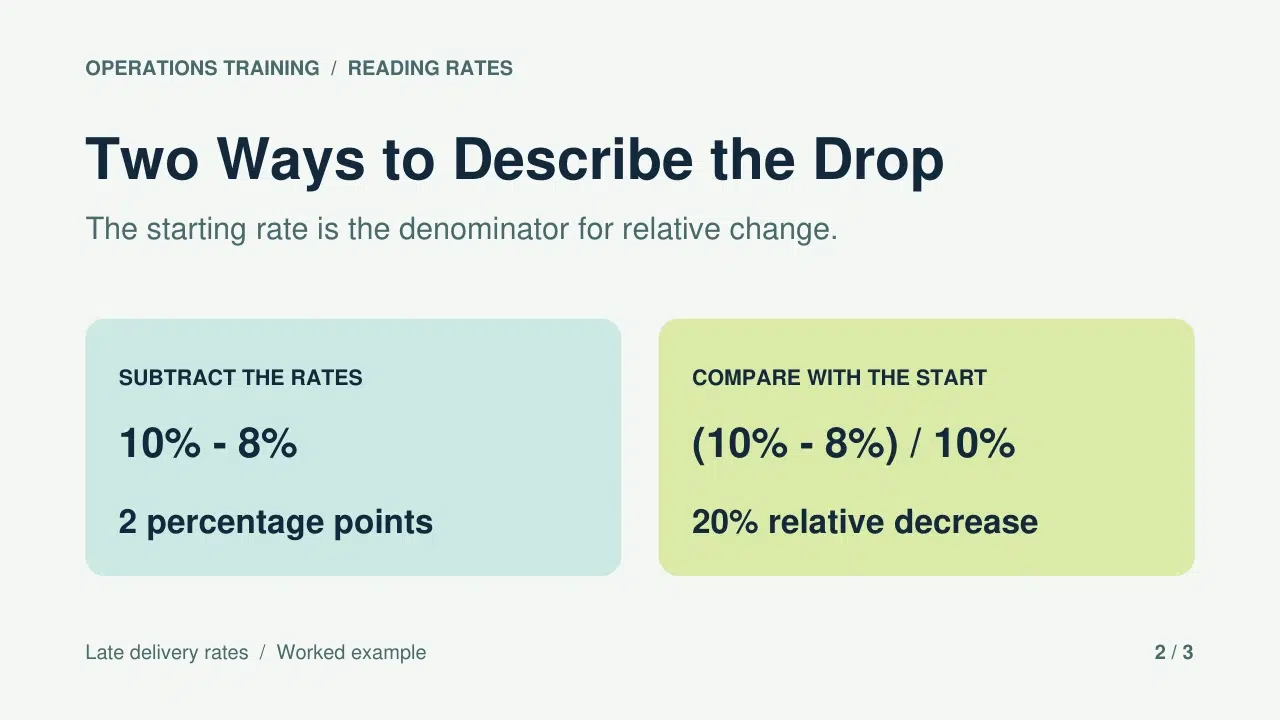
The handout says the late delivery rate went from 10% to 8%. A learner calls that “a two percent drop.” You know they found the difference between the numbers, but did they compare it with the starting rate? When you convert a lecture PDF to video, the voiceover can walk learners through that distinction while both calculations are on screen.
Here’s how to go from lecture PDF to video with Recastia. We’ll take one worked example from an operations lesson, turn it into three pages, and end with a practice question the viewer can pause to answer.
Start With a Question the Learner Can Answer
Pick one thing a learner should be able to do after watching. In this lesson, they should be able to describe a drop in a rate in two ways: in percentage points and as a percentage of the starting rate. That gives you a reason to keep the two weeks of delivery figures and leave the rest of the lecture in the handout.
Open with 10 late deliveries out of 100 in Week A and eight out of 100 in Week B. The same total makes it easy to see the change. Ask how much the rate fell before showing the calculation. Put the two answers side by side on the next page so viewers can see that the subtraction is the same in both. The calculation on the right goes one step further and divides the difference by the starting rate.
The last page switches the starting rate to 8% and the ending rate to 6%. Keep the answers off this page. The change is still two percentage points. The relative decrease is now 25% because two divided by eight is one quarter. That second example shows whether the learner knows which rate to divide by.
Make the Lesson Video With Recastia
Die PDF-Datei enthält die Zahlen und Formeln. Erklären Sie mithilfe des gesprochenen Textes, woher die einzelnen Zahlen stammen, und fordern Sie die Zuschauer auf, anzuhalten und selbst eine Aufgabe auszuprobieren.
- Laden Sie das dreiseitige PDF hoch.
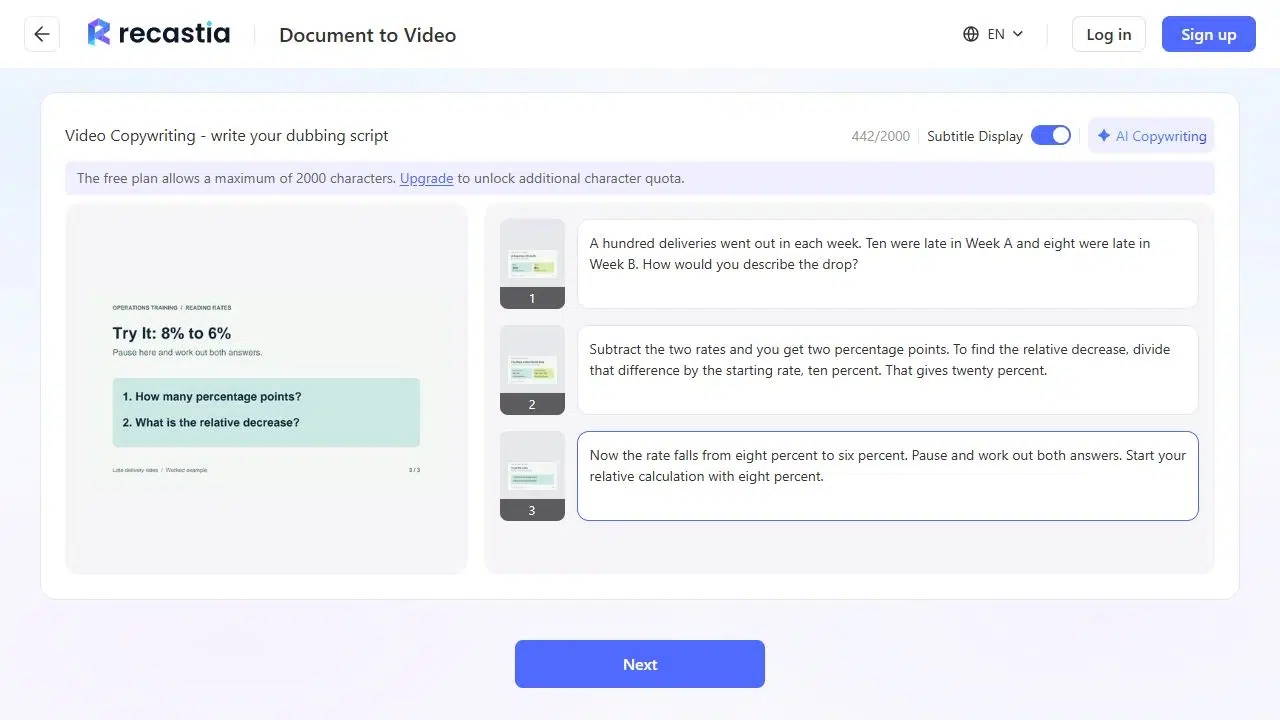
Offen PDF zu Video and upload the three pages. Horizontal Page Slide gives the calculations room to read side by side. Choose Advanced Mode for page-specific narration, keep all three pages, and select Manual Input to write the script yourself. The question, the worked calculation, and the practice prompt should appear in that order.
- Erklären Sie die Berechnung, während sie auf dem Bildschirm angezeigt wird.
On the first page, introduce the two weeks and ask how the learner would describe the drop. On the worked page, read through the subtraction first. Then say, “To find the relative decrease, divide those two percentage points by the rate we started with, ten percent.” The phrase “we started with” gives the learner a way to remember the denominator. Reading “two divided by ten” on its own misses that cue.
On the last page, say, “Now the rate falls from eight percent to six percent. Pause and work out both answers. Start your relative calculation with eight percent.” End the narration there if you’re putting the answer in the lesson notes. If you want to give the answer in the video, put it on a separate page after the prompt.
- Betrachten Sie die Lektion aus der Perspektive eines Zuschauers
Generate the video and play it with sound. If you see an account prompt, sign in to continue. The worked page should still be on screen when the voice says “ten percent.” Check any captions against the formula, especially the words “percentage points” and the numbers 10, 8, and 20. If a caption sits over a label, give the formulas more space on the original page and upload the revised PDF.
Play the last page once more and try pausing where the narrator asks you to. A useful practice page leaves the numbers and both questions visible in the paused frame.
Give Learners the Answer They Can Check Afterwards
Keep the original handout with the video. Put the answer below the prompt in the lesson notes: “8% − 6% = 2 percentage points. Divide those two points by the starting rate of 8% to get a 25% relative decrease.” If a learner divided by 6%, point out that 6% is the rate at the end of the period. They need the rate they started with.
If the video is part of a longer class, give it a title that names the question learners are about to solve. “Percentage Points and Relative Change” is easier to find again than “Lecture 4 Video.” Link to the full lecture separately for anyone who wants the other examples.
Häufig gestellte Fragen
Verwenden Sie diese Seite für das Lösungsbeispiel. Erstellen Sie eine separate Kopie zum Üben und entfernen Sie die Lösung sowie alle Hinweise darauf. Lassen Sie die Informationen, die Lernende zum Lösen der Aufgabe benötigen, einschließlich der Anfangs- und Endwerte, erhalten.
Wählen Sie einen kurzen Textausschnitt, der das Lernziel unterstützt. Schreiben Sie den Satz, die Definition oder den Vergleich, den Sie besprechen möchten, auf eine eigene Seite. Nutzen Sie die Sprachausgabe, um die Anwendung im Beispiel zu erläutern. Zitate und längere Hintergrundinformationen können Sie im Handout belassen, damit die Lernenden sie in ihrem eigenen Tempo lesen können.
Erklären Sie die Bedeutung der Rechenoperation im Skript. “Zwei Prozentpunkte durch den Ausgangswert von zehn Prozent teilen” ist verständlicher als “zwei von zehn”. Überprüfen Sie die Bildunterschriften in der Vorschau und lassen Sie die Formel im Seitenlayout sichtbar, damit die Lernenden die Erklärung mit der Berechnung vergleichen können.
Bitten Sie die Lernenden, kurz innezuhalten und ihre Antwort schriftlich oder in ihren Notizen festzuhalten. Falls Sie die Antworten sammeln müssen, stellen Sie die Frage auf Ihrer Kursplattform oder in einem separaten Formular und verlinken Sie dieses neben dem Video.
Abschluss
When you convert a lecture PDF to video, one question can do more for the lesson than an extra page of notes. Put the question first, explain the part learners tend to get wrong, and give them a fresh set of numbers to try.
Before you go from lecture PDF to video, decide where the answer will live. In this lesson, the video ends with a question and the notes show the calculation. Learners get a chance to try it first and a worked answer they can check afterwards.
Erwecke deine PDFs mit Recastia zum Leben!
Erstellen, individualisieren und teilen Sie Ihre Inhalte auf eine ansprechendere Weise.