
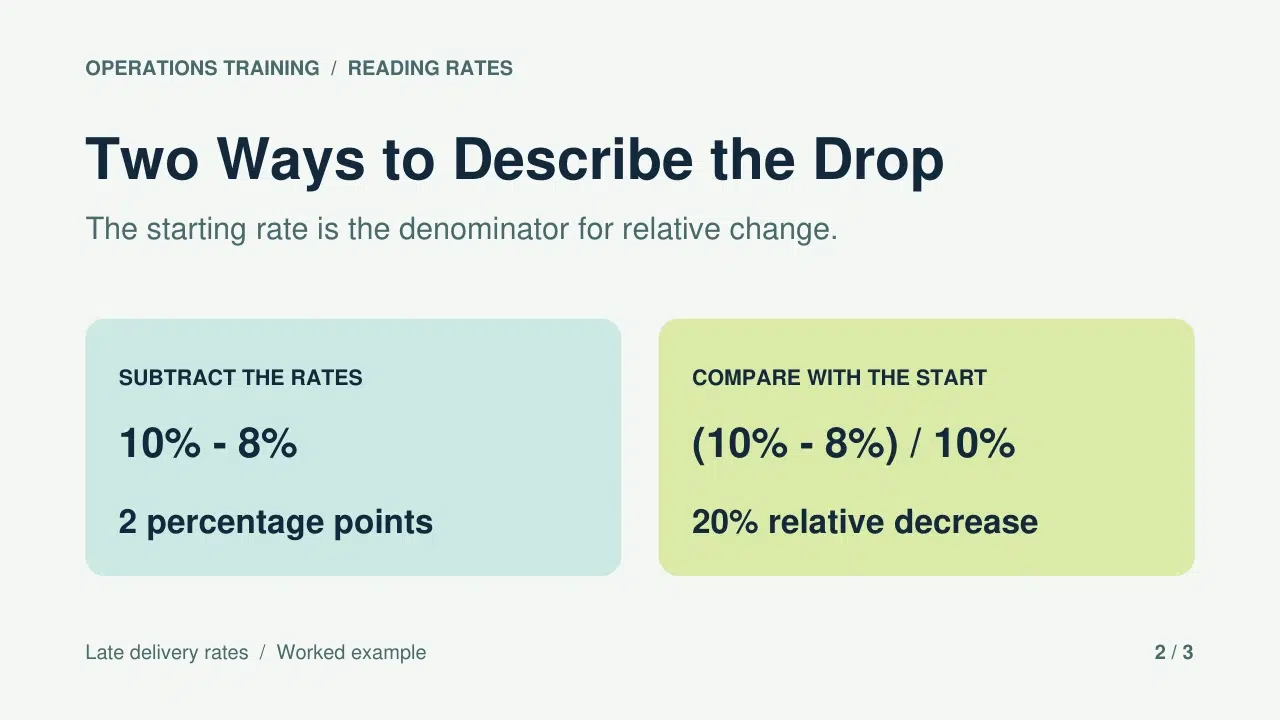
The handout says the late delivery rate went from 10% to 8%. A learner calls that “a two percent drop.” You know they found the difference between the numbers, but did they compare it with the starting rate? When you convert a lecture PDF to video, the voiceover can walk learners through that distinction while both calculations are on screen.
Here’s how to go from lecture PDF to video with Recastia. We’ll take one worked example from an operations lesson, turn it into three pages, and end with a practice question the viewer can pause to answer.
Start With a Question the Learner Can Answer
Pick one thing a learner should be able to do after watching. In this lesson, they should be able to describe a drop in a rate in two ways: in percentage points and as a percentage of the starting rate. That gives you a reason to keep the two weeks of delivery figures and leave the rest of the lecture in the handout.
Open with 10 late deliveries out of 100 in Week A and eight out of 100 in Week B. The same total makes it easy to see the change. Ask how much the rate fell before showing the calculation. Put the two answers side by side on the next page so viewers can see that the subtraction is the same in both. The calculation on the right goes one step further and divides the difference by the starting rate.
The last page switches the starting rate to 8% and the ending rate to 6%. Keep the answers off this page. The change is still two percentage points. The relative decrease is now 25% because two divided by eight is one quarter. That second example shows whether the learner knows which rate to divide by.
Make the Lesson Video With 레카스티아
PDF 파일에는 학습자에게 수치와 공식이 제공됩니다. 내레이션을 활용하여 각 수치가 어떻게 도출되었는지 설명하고, 시청자에게 언제 멈추고 직접 풀어봐야 하는지 알려주세요.
- 3페이지짜리 PDF 파일을 업로드하세요.
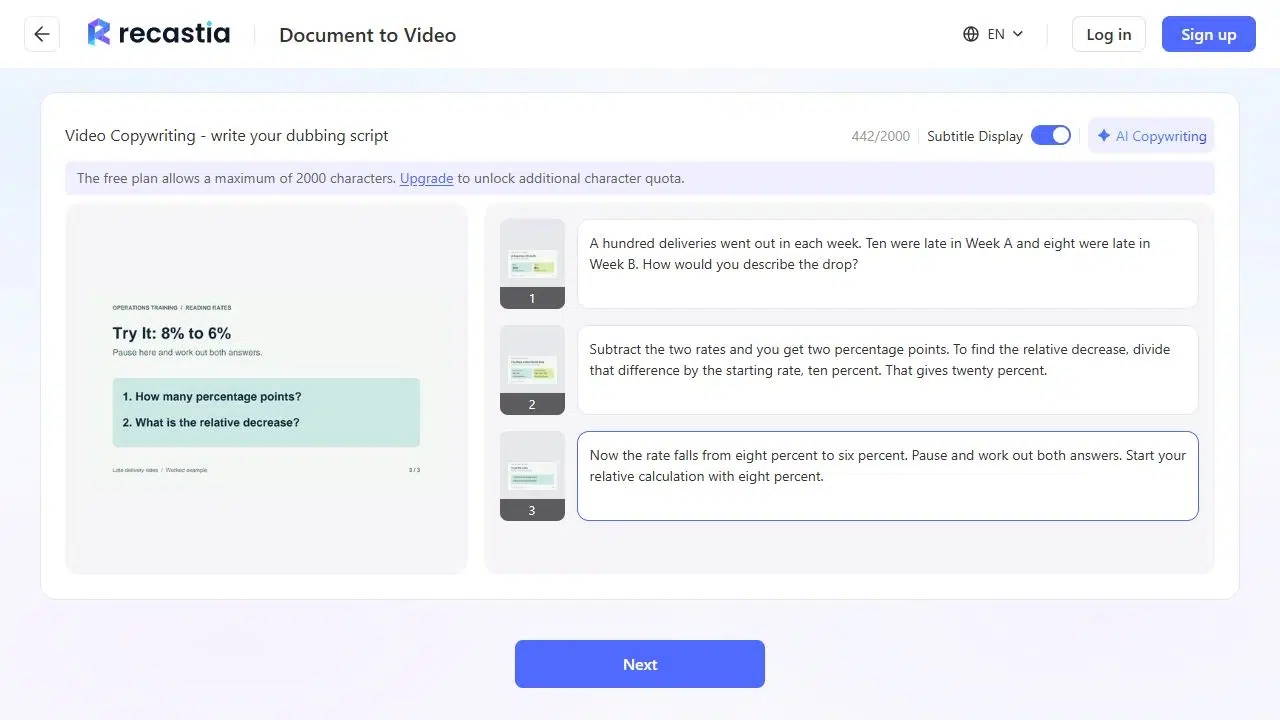
열려 있는 PDF를 비디오로 변환 and upload the three pages. Horizontal Page Slide gives the calculations room to read side by side. Choose Advanced Mode for page-specific narration, keep all three pages, and select Manual Input to write the script yourself. The question, the worked calculation, and the practice prompt should appear in that order.
- 계산 과정이 화면에 표시되는 동안 그 과정을 설명해 주세요.
On the first page, introduce the two weeks and ask how the learner would describe the drop. On the worked page, read through the subtraction first. Then say, “To find the relative decrease, divide those two percentage points by the rate we started with, ten percent.” The phrase “we started with” gives the learner a way to remember the denominator. Reading “two divided by ten” on its own misses that cue.
On the last page, say, “Now the rate falls from eight percent to six percent. Pause and work out both answers. Start your relative calculation with eight percent.” End the narration there if you’re putting the answer in the lesson notes. If you want to give the answer in the video, put it on a separate page after the prompt.
- 시청자의 입장에서 수업을 복습해 보세요.
Generate the video and play it with sound. If you see an account prompt, sign in to continue. The worked page should still be on screen when the voice says “ten percent.” Check any captions against the formula, especially the words “percentage points” and the numbers 10, 8, and 20. If a caption sits over a label, give the formulas more space on the original page and upload the revised PDF.
Play the last page once more and try pausing where the narrator asks you to. A useful practice page leaves the numbers and both questions visible in the paused frame.
Give Learners the Answer They Can Check Afterwards
Keep the original handout with the video. Put the answer below the prompt in the lesson notes: “8% − 6% = 2 percentage points. Divide those two points by the starting rate of 8% to get a 25% relative decrease.” If a learner divided by 6%, point out that 6% is the rate at the end of the period. They need the rate they started with.
If the video is part of a longer class, give it a title that names the question learners are about to solve. “Percentage Points and Relative Change” is easier to find again than “Lecture 4 Video.” Link to the full lecture separately for anyone who wants the other examples.
자주 묻는 질문
해당 페이지를 풀이 예시로 사용하세요. 연습용으로 별도의 사본을 만들고 정답과 정답을 알려주는 모든 표시를 제거하세요. 학습자가 문제를 푸는 데 필요한 정보(시작값과 끝값 포함)만 남겨두세요.
학습 목표를 뒷받침하는 짧은 발췌문을 선택하세요. 논의하고자 하는 문장, 정의 또는 비교 내용을 별도의 페이지에 작성하세요. 음성 해설을 사용하여 예시에서 어떻게 적용되는지 설명하세요. 인용문과 자세한 배경 설명은 배포 자료에 남겨두어 학습자가 각자의 속도에 맞춰 읽을 수 있도록 하세요.
스크립트에 연산의 의미를 명확하게 적어주세요. "2퍼센트 포인트를 시작 비율인 10퍼센트로 나누기"라고 쓰는 것이 "2/10"이라고만 쓰는 것보다 훨씬 이해하기 쉽습니다. 미리보기에서 캡션을 확인하고, 학습자가 단어와 계산을 비교할 수 있도록 페이지 디자인에 공식을 보이도록 배치하세요.
학습자들에게 잠시 멈추고 종이나 노트에 답을 적도록 요청하세요. 답변을 수집해야 하는 경우, 질문을 강의 플랫폼이나 별도의 양식에 넣고 영상 옆에 링크를 걸어두세요.
결론
When you convert a lecture PDF to video, one question can do more for the lesson than an extra page of notes. Put the question first, explain the part learners tend to get wrong, and give them a fresh set of numbers to try.
Before you go from lecture PDF to video, decide where the answer will live. In this lesson, the video ends with a question and the notes show the calculation. Learners get a chance to try it first and a worked answer they can check afterwards.
Recastia로 PDF에 생동감을 불어넣으세요
더욱 매력적인 방식으로 콘텐츠를 제작, 맞춤 설정하고 공유하세요.