
A prospect asks whether your process would work on their overnight shift. The chart in your white paper shows a faster resolution time. The footnote says the pilot excluded nights. Your rep needs both details in the same place. Good sales enablement content puts them together.
To create sales enablement content from a white paper, pull out one finding and keep its limits attached. Put the result on a one-page brief the buyer can forward, put the hard question on a card the rep can use live, and build a short presentation around the decision the buyer has to make.
Key Takeaways
- Put the sample, measurement, and exclusions next to the headline number in the brief.
- Give the rep an approved answer and a follow-up question on the objection card.
- End the deck with a trial the buyer can scope in the meeting.
Start With the White Paper’s Evidence
Suppose you have a white paper called Handling Shipment Exceptions at Two Distribution Sites. A buyer wants to know whether to try the same process at their warehouse. They care about how long flagged shipments stay unresolved and whether the findings apply to their overnight team.
Source excerpt from the illustrative white paper
Across a 12-week pilot at two distribution sites, the median time from shipment flag to verified resolution was 12 minutes, compared with 18 minutes in the pre-pilot baseline. The analysis included 240 flagged shipments during the pilot. It covered daytime operations, excluded overnight shifts, and did not use separate control sites.
Open the results and methods pages together. The chart gives you 18 and 12. The methods tell you what the clock measured, and the limitations tell you which shifts the result covers. Keep all three in a shared source note with their page numbers. A rep who only has the chart can easily quote “six minutes saved per shipment,” which mistakes a change in medians for a result on every shipment. Use that note to check the wording in each of the three sales enablement materials.
| Sales asset | Buyer question | When to use it |
| One-page evidence brief | What did the pilot actually find? | Send it to the buyer to forward to operations. |
| Objection-handling card | Does this apply to our overnight shift? | Keep it in front of the rep during a call. |
| Three-slide sales presentation | How would we test this at our site? | Walk through it with the person who can approve a trial. |
1. Build a One-Page Evidence Brief
Give the buyer enough detail to forward the page without writing a separate explanation. Replace the white paper’s background with the question the buyer asked, followed by the metric, the scope, and a next step. Keep the limitation directly under the result so it travels with the number if someone copies it into an email.
- Headline. How long did it take to resolve a flagged shipment?
- Finding. Median resolution time was 12 minutes in the pilot, compared with 18 minutes in the pre-pilot baseline.
- How it was measured. From the time a shipment was flagged to the time its resolution was verified. The 12-week pilot covered 240 flagged shipments at two distribution sites.
- Where the result applies. The analysis covered daytime operations. It excluded overnight shifts and used no separate control sites.
- Next step. Pick one site and agree on how you’ll record the start and end of each exception before trying the process.
Put the white paper title and a link to the approved source at the bottom. Remove details that won’t help the buyer interpret this finding, such as a full timeline of project meetings. Keep enough of the method for an operations lead to decide whether the comparison is relevant.
2. Make an Objection-Handling Card for Reps
The limitations paragraph becomes a short answer the rep can say out loud. Use the buyer’s actual question as the card title so the rep can find it mid-call. Keep the buyer-facing wording separate from the internal reminder.
Buyer asks
“Our biggest backlog is overnight. Would we see the same result on that shift?”
Rep answers
“The pilot measured daytime shifts, so we don’t have an overnight result to quote. If overnight is where you want to start, let’s agree on how your team will log each flagged shipment and its verified resolution. Then we can compare overnight results with your own overnight baseline.”
Internal reminder
The 18-to-12-minute comparison came from daytime shifts at two sites, with no separate control sites. Use it to explain what was observed. Ask who owns the overnight exception log and how that team handles shipments still open at handover.
End the card with one follow-up action. Ask the shift lead to confirm who records the flag and what counts as verified resolution.
3. Turn the Evidence Into a Three-Slide Sales Presentation
For a meeting, change the order of the white paper. Start with the buyer’s question, show the evidence and its limits, and end with a decision they can make in the room.
| Slide | What the buyer sees | What the rep says |
| 1. Can we resolve shipment exceptions sooner? | 18 minutes before the pilot and 12 minutes during it. Label both figures as medians. | “The clock starts at the shipment flag and stops at verified resolution.” |
| 2. Where does that result apply? | Two sites, 240 flagged shipments during the pilot, daytime only, no separate control sites. | “The data gives us a starting point. It leaves your overnight shift open.” |
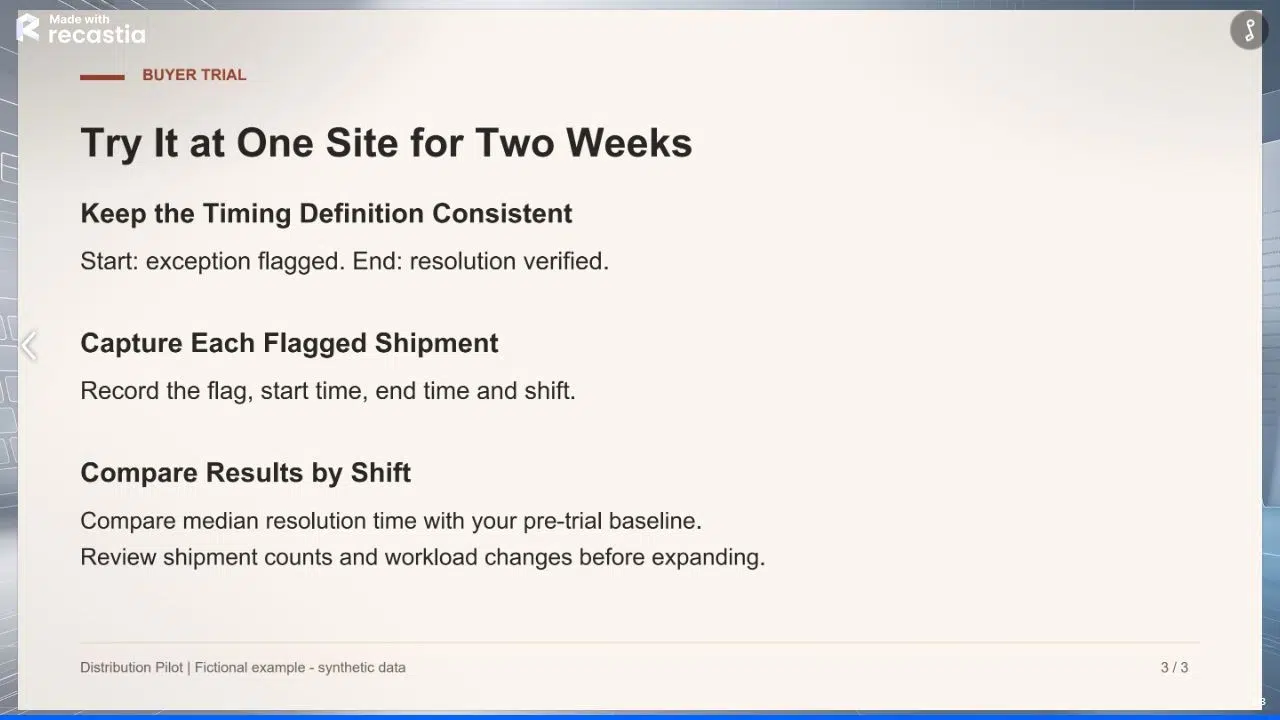
| 3. What would we try at your site? | A proposed two-week trial at one site, with a matched baseline by shift. | “Can we agree on the site, the shift, and who will record each flag and resolution?” |
On the last slide, ask the team to record the flagged shipment, start time, verified resolution time, and shift. Compare medians for the same shift before and during the trial. Keep unresolved shipments visible as a separate count so a faster median among closed cases doesn’t hide a growing backlog.
Share the Prepared Slides With Recastia
Use Recastia when you want buyers to open the three slides in a browser after the meeting. Finish the copy and source notes in your slide file first. The browser version gives the operations lead a way to go back to the trial plan after the call.
- Upload the Three-Slide Brief
Open the PDF to Presentation tool and upload the finished slide PDF. Upload only the slides cleared for buyer use. The internal objection card stays with the sales team.
- Review the Slides in the Browser
Choose Minimal Mode for a deck the buyer can browse without narration. Keep the three slides selected and choose Generate. In the browser viewer, check that slide two keeps the pilot limits readable and slide three gives the buyer enough information to plan the trial.
- Prepare the Buyer Copy
Sign in to get the presentation’s share link. Open it in a signed-out window to check access before adding it to an email. In the message, point the buyer to the page they’ll need, such as the trial plan on slide three.
Frequently Asked Questions
Sales enablement content is material a seller uses to help a buyer evaluate an offer or take the next step. Some pieces go to the buyer, such as an evidence brief or a presentation. Others stay with the seller, such as a card with approved answers to common objections.
Use the specific evidence it does contain. That might be a documented process, a tested requirement, or a finding from interviews. Say where the evidence came from. Give the buyer a question they can test in their own operation if they need a numeric comparison.
Check what the customer approved for reuse and keep the wording and attribution intact. Permission for one white paper may cover only that publication. If you don’t have clearance for the new material, use an approved finding you can substantiate without the quote.
Assign one owner to the shared evidence note and record which edition of the white paper it cites. When a number or a limitation changes, update the brief, the rep’s card, and the deck from that note. Retire the old files where reps usually find them.
Conclusion
Start with the buyer question your team hears most often. For the distribution pilot, the useful sales enablement content starts with a specific answer about daytime operations and a practical way to check what happens overnight.
Before sharing the sales enablement content, read the number and its scope in each version. A buyer who sees only the brief should understand the same limits as a buyer who sat through the presentation.
Bring Your PDF to Life With Recastia
Create, customize, and share your content in a more engaging way.