
You already have an event notice. Now you need a short video that tells people when to come and how to book. AI content repurposing can give you a script to work from, using the same PDF you already send to attendees.
An AI content repurposing tool can turn a list into sentences that are easier to follow by ear. Once you have a draft, read it alongside the PDF. Start with anything a listener might act on, such as a deadline, a fee, or a booking requirement.
Key Takeaways
- Choose what you want to make, then give AI one approved source to work from.
- Review the details that matter for that format. A video script needs to make sense to someone who never opens the PDF.
- Keep the lines that read well and carry the facts across. Rewrite any line that changes what people need to do or what they can expect.
Decide What You Want to Make
Start with the job the new piece has to do. A slide deck should make a finding easy to explain in a meeting. A follow-up email should give someone the next step without asking them to read the whole handout. Each format leaves out some of the source, so each one needs a different check.
| What You Have | What AI Can Draft | What to Review |
| A research report for a meeting | A short deck outline built around the main finding | Check the sample size and any limitations that change how the finding should be read. |
| A customer training handout | A follow-up email with the next action | Check who needs to act, what they need to do, and which link or deadline applies. |
| An event notice in PDF | A short voiceover script based on the notice | Check that a listener knows when to come, whether they qualify, and how to book. |
Read the Draft as Someone Who Has Never Seen the PDF
Say you’re making a video for a community Repair Clinic. The notice says adults can bring one small household item for assessment. It’s free to attend, but everyone must book ahead. Whether the item can be repaired depends on its condition.
The AI draft did a good job with the date and kept the repair condition. The line that needed a closer look was “Adults 18+ can book their free spot now.” If that were the only line you heard about registration, you could easily assume walk-ins were welcome.
| What the PDF Says | What the AI Wrote | What the Voiceover Will Say |
| May 14, 2027, 10–11:30 a.m. | “Join our Repair Clinic on May 14, 2027, from 10-11:30 a.m. for an assessment.” | “The Repair Clinic takes place on May 14, 2027, from ten to eleven thirty in the morning.” |
| Free to attend. Adults 18 and over. Booking required. | “Adults 18+ can book their free spot now.” | “It is free to attend. Adults aged eighteen and over must book in advance.” |
| Bring one small household item for assessment. Repair depends on its condition. | “Here’s what to expect: bring one small household item for assessment. Repairs depend on its condition, and attendance doesn’t guarantee a fix.” | “Bring one small household item. The clinic will assess it. Whether staff can repair it depends on the condition of the item.” |
Writing out the time and breaking up the repair sentence make those lines easier to listen to. The booking line needs a factual correction. “Must book in advance” puts the requirement back, and giving the price its own sentence makes it clear that “free” refers to attending the clinic.
Read the revised script once without looking at the PDF. Could you tell a friend whether they can show up without booking? Would they know they’re bringing one item to have it assessed? If you have to look at the page to answer, put that detail back into the script.
Draft the Event Narration With Recastia
Use PDF to Video to make the announcement from the original pages. The PDF supplies the visuals and the edited script supplies the narration.
- Get a First Script From the PDF
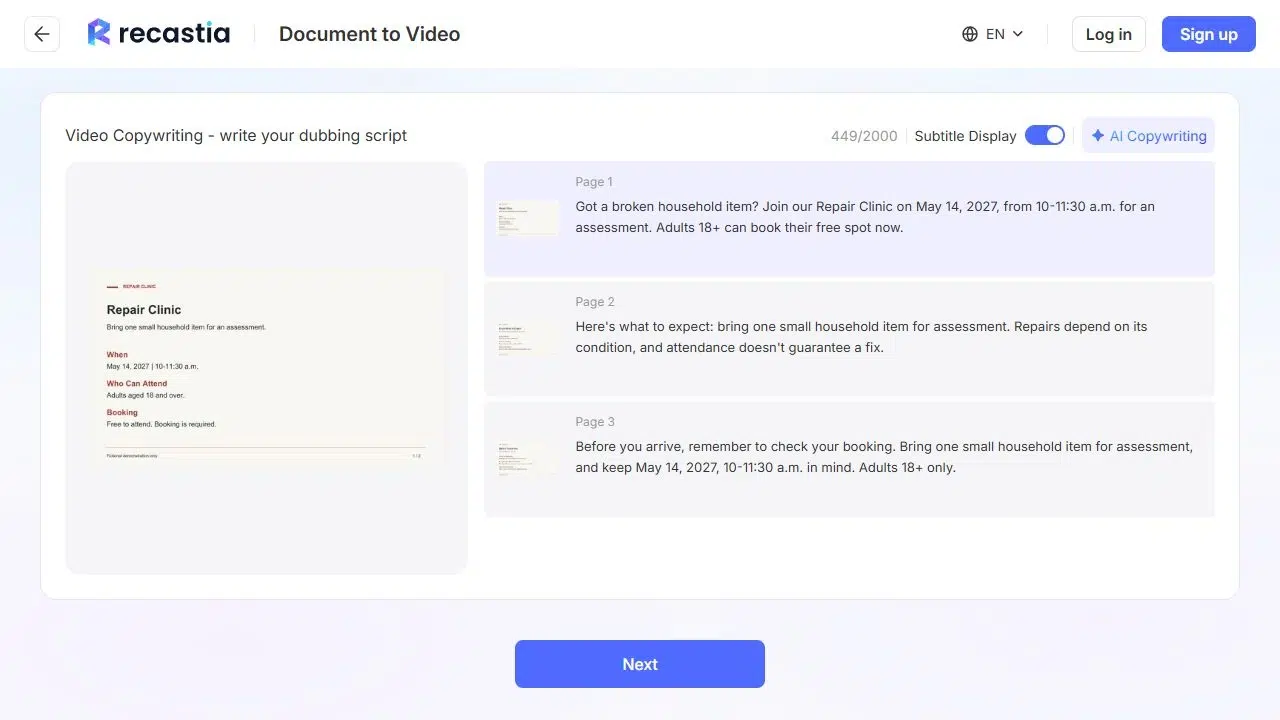
Upload the notice and choose a video template. In Advanced Mode, select the pages you want in the video. Choose AI Copywriting and select the language you want the script written in.
- Edit the Narration Beside Each Page
Put the booking rule on the page with the date and keep the repair condition on the page that shows what attendees can bring. If a sentence sounds fine and says what the PDF says, keep it.
- Play the Finished Video
Choose a voice, enable subtitles if viewers will need them, and generate the video. Play it through. Check that the date and instructions are easy to catch, and look at the captions for details like the time range and age limit.
Frequently Asked Questions
Ask the organizer which date is correct and update the source first. Check the cover, footer, and registration details for the old date. Then update the script and regenerate the video from the corrected PDF.
Yes. Pull the date, eligibility, and booking link into a short block the reader can scan. Keep the assessment condition near the line about what to bring, even if the rest of the email is much shorter than the script.
Find the closest line in the original. If the source says admission is free and the script says repairs are free, ask the organizer about repair costs. Use the confirmed admission wording while you wait for an answer.
Send the edited script and the source to the person responsible for the event or document. Point out the lines that describe costs, rules, or promises. A second person can then watch the video once and tell you what they understood.
Conclusion
When you use AI content repurposing for an announcement, listen to the script without the PDF open. If you can tell when to come and whether you need to book, the script can stand on its own.
If your team uses AI content repurposing regularly, save the PDF and the edited script together. The next editor can see which changes made the script easier to read aloud and which restored a requirement.
Bring Your PDF to Life With Recastia
Create, customize, and share your content in a more engaging way.