
An HTML5 Flipbook is an online publication that presents document pages in a browser with book-style navigation and page-turning effects. Readers can open it from a link, move through the pages, zoom in, and view the publication without downloading the original PDF first.
The term sounds technical, but creating one does not require writing HTML. In most cases, you upload a finished PDF to a flipbook platform, which places the document inside an online reader and gives you a hosted URL to share. Understanding that setup makes it easier to see how an HTML5 Flipbook differs from a PDF or a regular web page, and when each format is the better choice.
What Is an HTML5 Flipbook?
An HTML5 flipbook is a browser-based version of a page-designed document. It keeps the sequence and visual layout of the source pages while adding controls for online reading. Depending on the platform, those controls may include page thumbnails, zoom, full-screen viewing, search, sharing, and website embedding.
HTML5 refers to the web technology used by modern browsers. It replaced older Flash-based viewing experiences that required a separate plug-in. For readers, the practical difference is simple: the publication opens directly in a current browser on a computer, tablet, or phone.
An HTML5 flipbook is not usually a new document that replaces the PDF. The PDF remains the source of the page content and layout. The flipbook platform supplies the browser reader and the hosted address used to open it online.
How an HTML5 Flipbook Works
The process has three parts: the source document, the online reader, and the hosted URL.
The source PDF determines what appears on each page. Its typography, images, columns, page order, and other design choices remain part of the fixed page layout. If a brochure has a full-page photograph or a report uses carefully aligned charts, those elements stay together as a composed page.
The online reader adds the controls around those pages. It lets people move forward and backward, jump to a page, enlarge small details, or switch to full screen. A page-turn effect can make the publication feel more like a catalog or magazine, but the more important function is giving readers a clear way to browse the document online.
The hosted URL is the delivery method. Instead of attaching a large file to an email or placing a download button on a page, you share a link that opens the reader. Some services also generate a QR code or provide embed code so the publication can appear inside a website.
This setup does not convert the PDF into a responsive article. The original pages still have fixed dimensions, so text does not automatically reflow to match a narrow phone screen. Readers can zoom, but a document with very small type or dense tables may still be easier to read on a larger display.
HTML5 Flipbook vs. PDF vs. Web Page
All three formats can present the same information, but they deliver it differently. The right choice depends on whether preserving the page design, supporting offline access, or adapting text to different screens matters most.
| Format | Best Choice When | Reading Experience | Updating and Sharing |
| HTML5 flipbook | The finished page design should stay visible while readers browse online | Pages open in a browser with navigation, zoom, and other reader controls | Share the hosted link or place the reader on a website when embedding is available |
| People need the original file for downloading, printing, archiving, or offline reading | Opens in a browser or PDF application and retains the fixed page layout | Replace or resend the file when the document changes | |
| Web page | Text needs to reflow naturally across phones, tablets, and desktop screens | Content follows a responsive page layout and can be read without zooming | Update the page in the website CMS while keeping the same URL |
A flipbook is useful when presentation is part of the content. Product catalogs, lookbooks, portfolios, event programs, and visual reports often rely on complete page compositions. A normal web page is better when the main goal is fast reading on any screen, frequent text updates, or strong page-level accessibility. A PDF remains the clearest option when readers must download, print, annotate, or store the original document.
You do not have to choose only one. A publisher can use a flipbook for browser reading and still provide the PDF when downloading is important. The key is to give each format a clear purpose instead of treating them as interchangeable files.
Features to Look for in an HTML5 Flipbook Tool
Start with the reading experience. The pages should load clearly, and the navigation should be easy to understand without instructions. Check the publication on both a computer and a phone, especially if the source PDF contains small type, multi-column layouts, or detailed tables.
Next, look at how the platform handles sharing. A stable hosted link is the basic requirement. QR code sharing can help when the publication will appear on printed signs or event materials. Website embedding is useful when you want readers to view the publication without leaving your own site, although availability may depend on the plan.
Also review the customization options. A useful tool should let you give the publication a clear title and description and adjust the reader so it suits the document. Explore the available appearance and navigation settings, then preview the result before sharing it.
Privacy matters when the document is not intended for a public audience. Check whether the service offers the access controls your project requires. If the publication is part of a long-term archive, also find out how it is hosted and what happens to existing links if you change your account or plan.
Finally, be clear about the output. Some platforms publish a hosted flipbook but do not provide a downloadable HTML package for self-hosting. If you specifically need HTML files that can be moved to your own server, confirm that option before choosing a tool.
Creating an HTML5 Flipbook With Recastia
You can use Recastia to create the browser-based publication commonly described as an HTML5 flipbook. The PDF supplies the page content and layout; Recastia adds the online reader and publishes the flipbook at a hosted URL.
Upload your finished PDF, then use the editor to customize the flipbook. You can add a title and description, explore the appearance and navigation options, and preview the pages before publishing. Once it is ready, share the hosted link or QR code with readers. Recastia also provides website embedding on plans that include this feature.
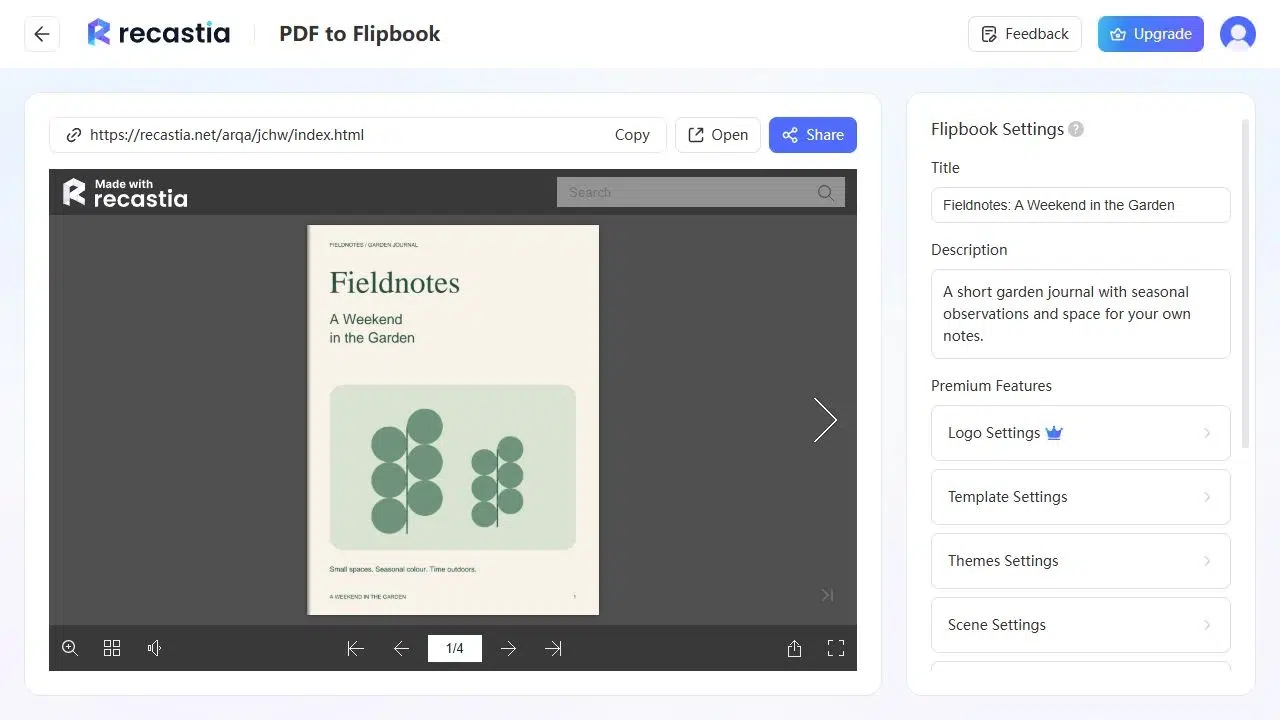
The current Recastia reader opens in a modern browser and does not require a Flash plug-in. Readers use the controls around the publication to turn pages, move through the document, zoom in, and enter full-screen view.
When an HTML5 Flipbook Is the Right Choice
Choose an HTML5 flipbook when the document is already designed and you want that design to remain central to the online experience. This is common with magazines, brochures, portfolios, catalogs, annual reports, and presentation-style publications.
It is also a practical choice when the document needs one link that can be opened from email, social media, a QR code, or a website. Readers see the publication in the browser, while you keep the original PDF available separately if downloading or printing is still useful.
Before publishing, look at the source pages on a phone. If the smallest important text remains readable with reasonable zoom and the page layout carries real visual value, the flipbook format is likely a good fit. If most readers need continuous text that adjusts instantly to a narrow screen, a responsive web page will serve them better.
Double-page designs need particular attention. A magazine spread may look excellent on a wide desktop display but appear as separate pages on a phone. Preview both views to make sure headings, images, and captions still make sense when the pages are shown individually.
Interactive HTML5 Flipbook Example Created by Recastia.
The example above shows how a designed publication can be read through a hosted browser reader while keeping its original page sequence and visual layout.
Frequently Asked Questions
No. A modern HTML5 flipbook opens in a current web browser without a Flash plug-in. This is one of the main differences between today’s browser-based readers and older digital publication viewers.
Not always. Many services publish the flipbook at a hosted URL rather than giving you an HTML package to place on your own server. If self-hosting is required, check the platform’s export options before you start.
The text and page design usually come from the source PDF. To make substantial content changes, edit the original document, export a new PDF, and update the publication. Flipbook settings normally control the reader and presentation rather than rewriting the page content.
Conclusion
An HTML5 Flipbook gives a finished document a browser-based reading experience while keeping its page design intact. The PDF provides the content, the online reader provides navigation, and the hosted URL makes the publication easy to open and share.
Use this format when visual pages are important and readers should browse them online. Choose a regular web page when responsive text is the priority, or keep the PDF available when people need to download, print, or archive the file. Once those differences are clear, it is much easier to decide whether an HTML5 Flipbook fits the way your audience will read the document.
Bring Your PDF to Life With Recastia
Create, customize, and share your content in a more engaging way.