
A new facilitator wants to know whether attendees can choose the right user role after a 30-minute workshop. You could send every training resource you’ve saved. A shorter answer would give them two readings, a reason to open each, and a question to try at the end of the workshop. That’s content curation.
Content curation is the practice of selecting existing material for a particular audience and adding enough context for people to use it. The work is in choosing what belongs, explaining why it matters, and putting it in an order that makes sense. Here’s how those decisions turn a folder of links into a reading pack someone can use before their first workshop.
What Makes a Collection Curated?
A curated collection starts with a question people need to answer. The editor decides which sources help, how much each reader needs to see, and where their own notes can make the material easier to apply.
The difference is easiest to see when the same team does four kinds of work.
| Kind of Work | What It Looks Like for a Training Team |
| Content aggregation | A feed collects new posts from several teaching centers. Staff can scan what’s been published. |
| Content creation | A facilitator writes an original guide to running the company’s first customer workshop. |
| Content repurposing | The team adapts its existing workshop guide into a short video for new facilitators. |
| Content curation | A trainer chooses two relevant readings, explains where to start, and adds a prompt the facilitator can try. |
A team might collect articles in a feed, curate a few of them into a guide, then turn that guide into a video. For help choosing a format for material you already have, see the content repurposing strategy guide.
How the Content Curation Process Works
Use these four steps to turn saved links into a short reading pack for a specific task.
- Start With One Question
Decide what the reader should be able to do after using the collection. “Learn about facilitation” could fill an entire course. “Write an end-of-workshop prompt that checks whether customers can choose the right role for a new teammate” gives the editor a way to decide which resources belong.
- Check What Each Source Can Contribute
Open the original source and read the section you plan to recommend. Record who published it, what it covers, and what part is relevant. Check the date when the material depends on current policy, product details, or data. A long guide can earn a spot for one useful section. Credit the publisher beside your note and link directly to that section when the page has a stable link.
- Write a Note That Helps the Reader Act
Give each item a short note with a starting point and a reason to read it. For a guide on learning objectives, “Good overview of assessment” says little. “Read the first three questions before you write your workshop prompt. Start with something the learner can demonstrate.” That note tells a busy facilitator what to look for and what to do with it.
- Put the Readings in the Order People Will Use Them
In a first-workshop pack, put the source on defining an objective before the source on writing an exit prompt. By the time the facilitator reaches the prompt, they’ll know what they want to check. Give optional reading its own space so the essentials are easy to find.
A Worked Example for First-Time Facilitators
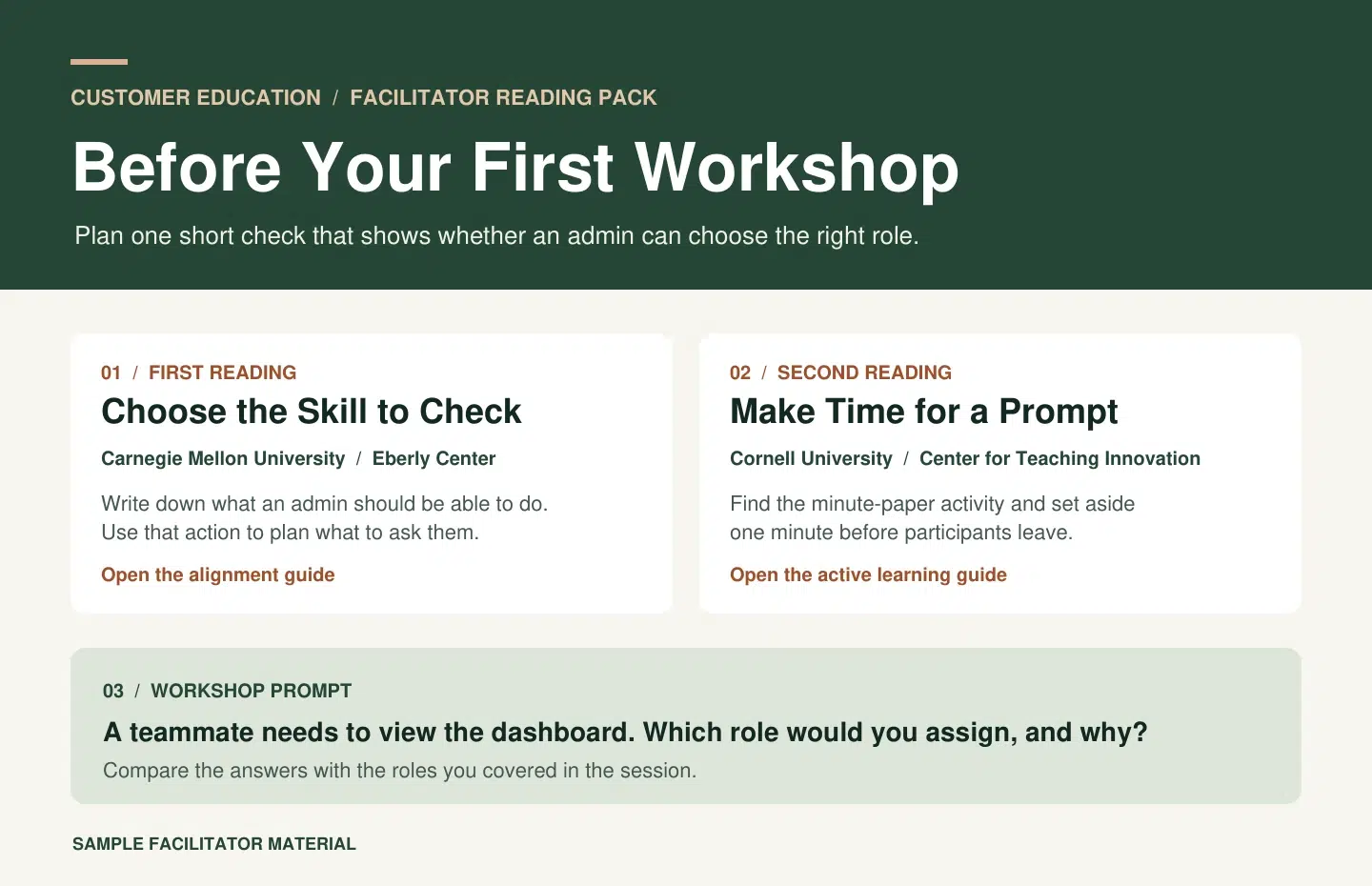
Picture a customer education team preparing colleagues to run their first product workshop. The workshop teaches customer admins how to invite a teammate and choose the right role. The team can build a short pack with two public sources and one original practice prompt.
| Reading or Activity | Why It Belongs | Note for the Facilitator |
| Align Assessments, Objectives, and Instructional Strategies, Carnegie Mellon University’s Eberly Center | It gives the facilitator a way to tie the assessment to the skill taught in the workshop. | Write down what an admin should be able to do by the end. Use that action to choose what you’ll ask them to demonstrate. |
| Getting Started With Active Learning Techniques, Cornell University’s Center for Teaching Innovation | Its minute-paper exercise helps you find out where learners still have questions. | Save a minute at the end. Ask learners to name the role they’d assign in a specific situation and explain their choice. |
| Team practice prompt | It connects both readings to the actual workshop. | “A teammate needs to view the dashboard. Which role would you assign, and why?” Compare the answers with the roles covered in the session. |
A longer resource on planning a full course can stay in the team’s reference folder. The two selected readings and the prompt give the facilitator enough to prepare a first session. If the prompt later surfaces confusion about one of the roles, the next edition could add a short role comparison beside it.
Two Other Places to Use the Same Method
- A sales research brief. A sales lead preparing for a discovery call picks a prospect’s latest earnings release and a product announcement. Their notes point to the parts worth reading and flag one question to ask on the call.
- A customer support resource page. A support editor puts the quick-start guide first, the permissions article next, and the troubleshooting page last. A short note under each link tells customers when to open it.
Share the Finished Reading Pack With Recastia
Use a format that suits the way people will refer back to the material. A weekly email works when readers need a few links once. A short PDF can suit a facilitator cohort that needs the same reading order and practice prompt for every session.
If you’ve laid out the pack as a PDF, Recastia’s Flipbook Maker can turn it into a browsable publication. Keep each source title and credit on the page with your note. When you share the finished link, tell facilitators which page to read first. A little direction in the message can save them a scan of the entire pack. For the publishing steps, see how to view a PDF as a flipbook online.
Frequently Asked Questions
Start with enough to answer the question you chose. Two readings can be plenty for a first workshop. A research brief on a disputed topic may need several independent sources. Check what each additional item contributes before expanding the list.
Yes. An internal guide can fill a gap, such as showing where employees carry out a step discussed in an external article. Give the internal source the same kind of note you give the other items. Check access before sharing the collection outside your company.
Find the condition behind each recommendation. One source may be writing for a large class and the other for a group of six. Note the difference beside the links and explain which advice fits your audience’s situation. If a contradiction remains unresolved, show readers where the two sources disagree.
Review it when a key source changes, a link stops opening, or readers keep asking a question the collection misses. If the pack belongs to an onboarding or training cycle, check the links and notes before sharing it with the next group.
Conclusion
A practical way to start content curation is to pick one question and write a note for each source that helps answer it. A facilitator who can go from those notes to a workable session prompt has what they came for.
For your next content curation project, look at the last resource you added. If you can’t give readers a clear reason to open it, leave it in your reference folder.
Bring Your PDF to Life With Recastia
Create, customize, and share your content in a more engaging way.