
What is Recastia? In practical terms, it is a PDF-first content platform: you upload one finished document and choose what your audience needs — a flipbook to browse, a video to watch, a presentation to deliver, a website to visit, a 3D exhibition to explore, a chatbot to answer questions, or an editable file to keep working on.
This guide explains the seven creation paths, the shared workflow behind them, and how to choose the right output for a given audience.
Key Takeaways
- Recastia turns one finished PDF into seven formats: flipbook, video, presentation, website, 3D exhibition, chatbot, or editable document.
- Every path starts from the same source file — the PDF supplies the content, the format changes how people experience it.
- Choose the output by the audience’s next action: browse, watch, present, scan, explore, ask, or edit.
- AI reduces production work, but review stays manual — names, numbers, and claims need a human pass before sharing.
- Keep the original PDF. It remains the printable, archivable reference even after other versions exist.
Recastia Starts With Content You Already Have
Plenty of content projects begin with a finished file: a product catalog, training guide, sales deck, report, ebook, portfolio, brochure, or internal manual. The document may be accurate and carefully designed, yet a PDF still has practical limits. On a phone it can feel cramped, it usually requires a download, and it does not turn itself into a narrated video or a browser-based experience.
Recastia approaches that problem from the source document. You upload the PDF, select the destination format, and work in the creation path for that output — instead of starting with an empty video timeline, a blank website, or a new slide deck. For a feature-by-feature walkthrough, see the Recastia features guide.
Recastia works best when the source material is already worth keeping. It cannot correct an inaccurate report, rescue weak copy, or give you permission to reuse images you do not own. Clean up the source first — every format that follows will inherit what is inside it.
What Can You Create With Recastia?
The dashboard presents seven creation paths. They share the same PDF-first idea, but they serve different communication goals.
PDF to Flipbook
PDF to Flipbook turns static pages into an interactive page-turning publication. It suits catalogs, magazines, brochures, lookbooks, ebooks, reports, and manuals that should retain their page design while becoming easier to browse online. The online catalog maker guide shows the full workflow.
Recastia Example
Interactive skincare catalog flipbook example
PDF to Video
PDF to Video uses the document as the basis for a video with visual scenes, animation, and narration. Choose it when viewers are more likely to watch than read — a short explanation, campaign asset, product overview, or training summary. A detailed reference document may still be better kept as a PDF or flipbook.
Recastia Example
PDF to marketing video example
PDF to Presentation
PDF to Presentation creates a presentation-oriented version of the source, with interactive slides, optional AI avatars, and narration. Choose this route when the information benefits from a presenter-led sequence — a meeting, lesson, webinar, or guided explanation.
Recastia Example
Interactive presentation example
PDF to Website
PDF to Website builds a ready-to-publish landing page without coding. Use it when a document needs a browser-based destination that can be shared as a web experience rather than an attachment — the source should already have a clear topic and hierarchy.
Recastia Example
PDF landing page example
3D Exhibition
3D Exhibition creates an immersive virtual gallery for collections and visual content: art, student work, event displays, portfolios, product collections. Do not choose it just because it looks impressive — it earns its place when discovery and visual exploration matter.
Recastia Example
Immersive 3D exhibition example
PDF to Chatbot
PDF to Chatbot generates an AI assistant that answers questions about the uploaded material — useful for dense guides, policy documents, and manuals where readers arrive with specific questions. The source still needs to be trustworthy and current; a conversational interface cannot repair inaccurate content.
Recastia Example
PDF chatbot example
PDF to Document
PDF to Document converts the source into editable files — Word, PowerPoint, Excel, or images. Choose it when the next task is editing, extracting, or rebuilding content rather than publishing an audience-facing experience.
How Recastia Works
Five decisions take you from a finished PDF to the right Recastia output: prepare the source, choose the destination, upload, customize, and review.
- Prepare the source PDF
Begin with the version you are authorized to use. Confirm that the text, page order, links, names, and contact details are final. Remove customer data, private information, unlicensed photographs, and third-party logos unless you have permission to publish them.
- Choose the destination before you create
Open the dashboard and match the creation path to the audience’s next action. Should they read, watch, present, browse, explore, ask questions, or edit? The answer matters more than whichever format looks most impressive in the menu.
- Upload the PDF and review the generated structure
After entering a creation path, upload the source file and review what the platform builds from it. Check titles, page order, visual hierarchy, and any generated text or media before treating the result as finished.
- Customize for the destination
Make choices for the output rather than trying to preserve every aspect of the source. A video needs pacing. A presentation needs clear stages. A website needs scannable sections. A chatbot needs dependable source information.
- Review before sharing
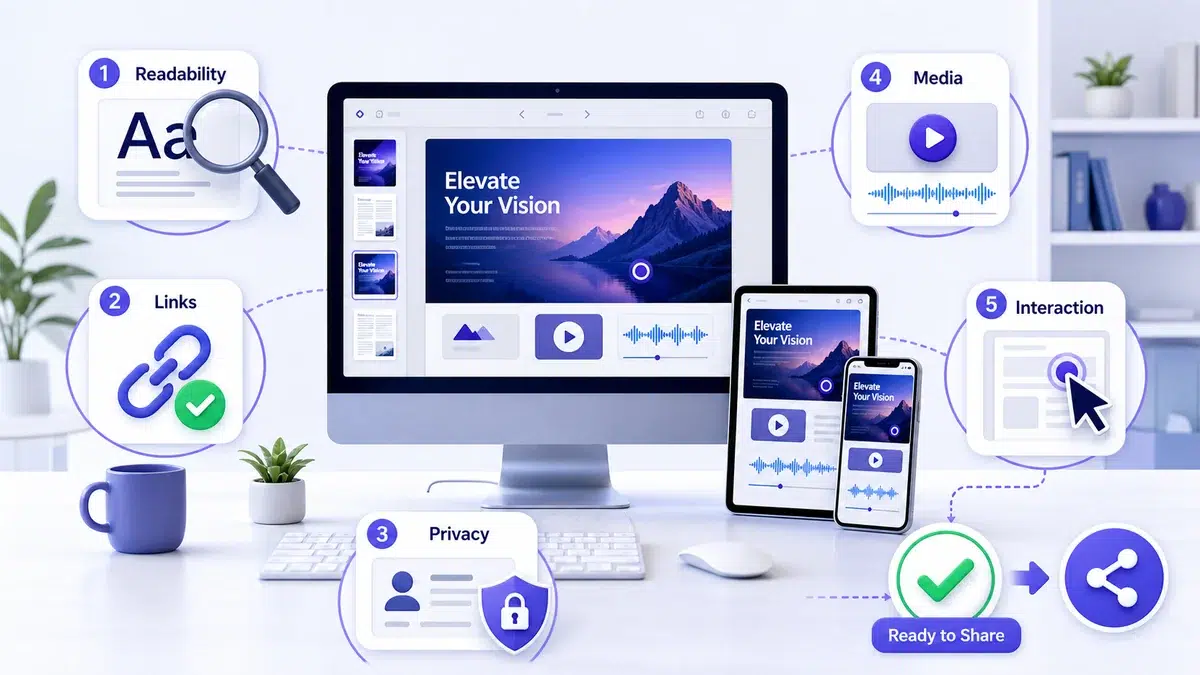
Open the result as a viewer would. Check it on an appropriate screen size, confirm that text is readable, verify links, and make sure private account details are not visible. If narration, animation, or interactive elements are present, review the complete experience rather than only the first screen.
How to Choose the Right Output
Start with the audience’s job:
- Choose a flipbook when people should browse designed pages in sequence.
- Choose a video when narration and motion can communicate the main ideas faster.
- Choose a presentation when someone will guide an audience through the material.
- Choose a website when the content needs a browser-based campaign or information destination.
- Choose a 3D exhibition when spatial exploration adds value to a visual collection.
- Choose a chatbot when readers are likely to ask specific questions about a dense source.
- Choose a document conversion when the next step is editing rather than publishing.
You do not need seven versions of every PDF. One output that fits the channel beats a folder full of versions nobody asked for. Keep the PDF as the reference, perhaps add a flipbook for self-paced browsing, and reserve video for a message that genuinely benefits from motion or narration.
Who Is Recastia For?
Recastia fits teams and creators who already produce document-based content and need it delivered in a different format:
- Marketing teams — repurpose brochures, campaign reports, catalogs, and product PDFs
- Educators — adapt learning materials into presentations, videos, exhibitions, or question-led experiences
- Sales teams — make product and proposal content easier to present and share
- Publishers, designers, and artists — turn finished publications and portfolios into browsable online experiences
- Associations, nonprofits, and internal comms — reuse reports, newsletters, and documentation across channels
The common requirement is not a particular industry — it is a useful PDF and a clear reason to present that information differently.
Honest Limits: What Recastia Does Not Replace
- Editorial judgment. Someone still needs to choose the right message, confirm accuracy, protect private information, and decide where the final content belongs.
- The original PDF. It may remain the best format for printing, formal archiving, detailed reference, or offline access.
- Source quality. Repurposing extends good content — it cannot fix an inaccurate report or a weak document. If the project has no cleared, finished source, fix that first.
Frequently Asked Questions
No. Recastia uses a PDF as the source for several publishing, presentation, conversational, immersive, and editable outputs. The value is in choosing a format for a specific audience, not merely changing a file extension.
No. The dashboard organizes creation by output type, and the PDF to Website path is a no-code workflow. You should still understand your source content and review the generated result carefully.
Choose according to the audience’s next action. Use a flipbook for browsing, video for watching, presentation for guided delivery, website for browser-based publishing, exhibition for spatial exploration, chatbot for questions, and document conversion for editing.
Yes. The platform is organized around multiple creation paths that begin with a PDF. Create only the versions that have a defined channel and audience rather than producing every possible format by default.
Usually, yes. The PDF remains useful as the approved source, printable version, archive, or detailed reference even when other formats are created for sharing and engagement.
Recastia gives one source document seven clear destinations while leaving you responsible for accuracy, audience fit, privacy, and final review. Start with what the audience needs to do, then select the format that supports that action — try it with your own PDF.
Cassie is the Product Manager at Recastia, where she leads the design of the platform’s PDF conversion and publishing workflows — the same workflows covered in these guides. She writes from direct involvement in how the product is built: what each setting does, why it works that way, and where the real limits are.