
Your team is about to release a new signup form. You’ve found a guide, a directory of testing tools, and advice on involving users. Send all three links and everyone still has to figure out where to start. Send a short brief that opens with the first check, and a teammate can start right away.
Here’s how to choose the sources for that release brief and turn it into a short narrated video with Recastia. The three content curation examples later in the article show what to put on the page, what to leave behind a link, and when a little explanation helps. You can use the same content curation examples to plan a brief for your own team.
Choose What the Team Needs to See
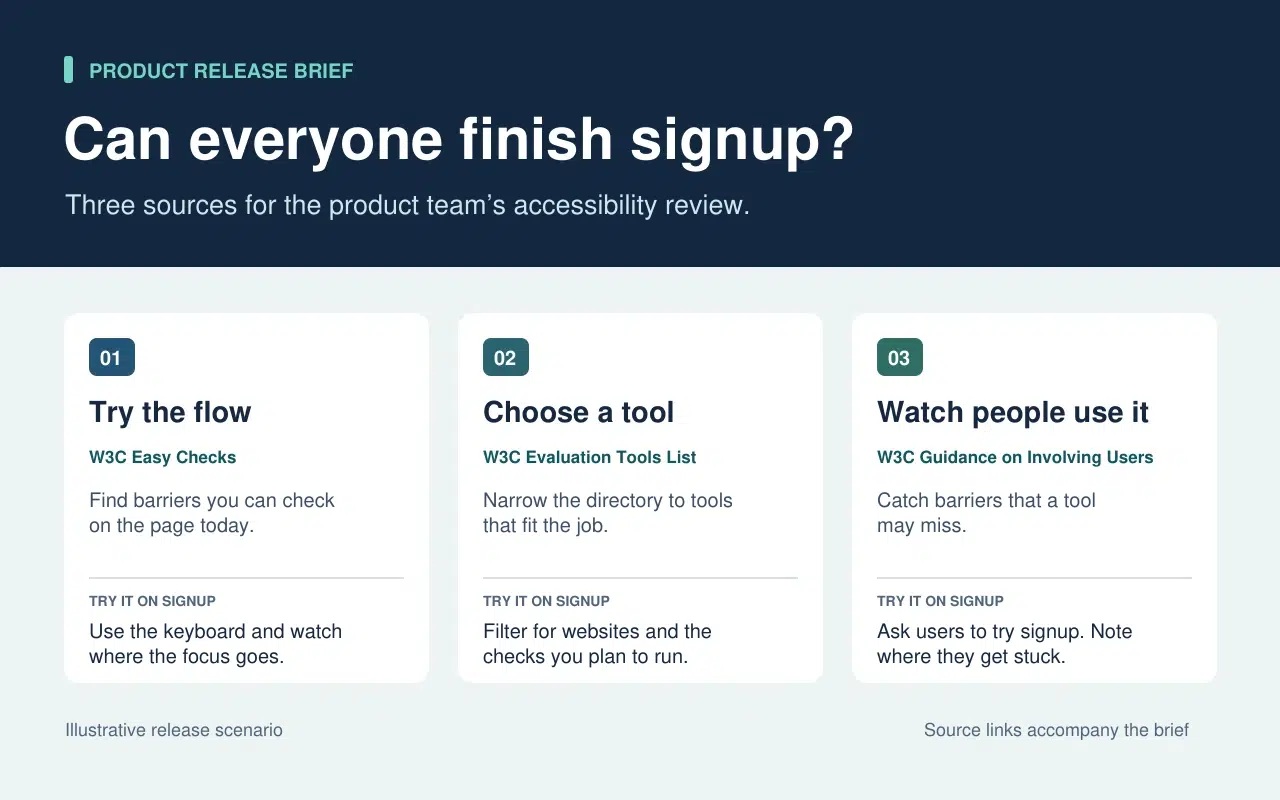
The release lead needs to know what the team can check today and what needs more time or help. That decision sets the order of the brief. Start with a keyboard check the team can run now. Then point to tools for anything that needs a closer look. Finish with the checks that require watching people use the form.
| What Goes Into the Brief | What Stays in the Source |
| A quick keyboard check from W3C Easy Checks. Start at the email field and press Tab. Record the last control you could identify if the focus indicator disappears. | The rest of the preliminary checks. Link to them so a teammate can use the full checklist in a broader review. |
| A link to the W3C evaluation tools directory beside the task that still needs a tool. | The full list of tools, which people can filter once they know what they need to test. |
| One action from the W3C guidance on involving users. Ask participants to go through signup and note the first step where they need help. | The full guidance on planning a user evaluation. Keep it available to the person running the session. |
The written brief gives each link a reason to be there. If a source doesn’t change what someone should check or do next, leave it in the research notes. That keeps the release brief short enough to use during the review.
Turn the Brief Into a Short Video With Recastia
Crea un video para los compañeros que se perdieron la revisión de la versión o que necesitan una explicación rápida antes de probar el formulario. Conserva el resumen escrito con sus enlaces de origen. En el video, usa la voz en off para señalar lo que alguien podría pasar por alto al leer la página rápidamente.
- Asigna una página a cada tarea.
Utilice las tres filas del resumen para crear un PDF de tres páginas. La primera página muestra dónde comenzar la verificación del teclado. La segunda solicita al equipo que enumere lo que aún necesita probar antes de elegir una herramienta. La última explica qué registrar cuando alguien intenta completar el formulario de registro. Mantenga cada página legible en tamaño de video. Una instrucción y un breve ejemplo son suficientes.
- Agregar la explicación en PDF al video
Upload the three-page brief to PDF a vídeo and choose a template that keeps the instructions easy to read. In the page-by-page workflow, enter a line of narration for each page. On the keyboard page, say “Press Tab from the email field to Continue. If you lose track of the focus indicator, write down the last control you could see.” On the user session page, tell the team what to record when a participant asks for help.
- Vea una vista previa del video con el resumen adjunto.
Genera el video y pausa la reproducción en la primera tarea. Asegúrate de que la acción en pantalla coincida con la narración y de que los subtítulos permitan leer las instrucciones. Comparte el video junto con el informe escrito. Un compañero de equipo puede ver el tutorial antes de la prueba y consultar directamente la guía original cuando necesite más detalles.
Three Public Examples and What to Borrow From Each
Make It Easy to Narrow a List
The W3C directory puts its filters before the tool entries. Readers can choose what they need to test before they browse names. In the release brief, borrow that idea by telling the team which check to run before you send them to the directory.
Put Evidence Where Readers Need It
The UK Parliament’s Heat Networks briefing opens with the findings. It then explains how buildings share a network before discussing where one would work, who pays for the pipes, and what customers experience. Borrow the sequence. Give the team enough context to understand the first check and put deeper evidence where it affects a decision.
Give Each Link Enough Context to Earn a Click
An issue of The Browser introduces a piece about cryptic crosswords and modernist poetry, then tells you it runs to 3,630 words. The description helps you decide whether it’s interesting. The word count helps you decide whether to read it now. In a work brief, a section name or a page number can do the same job. Tell a colleague where to look before they open a long report.
Preguntas frecuentes
Primero, revise la licencia y los términos de reutilización. Si el permiso no está claro, enlace al original y explique el hallazgo relevante con sus propias palabras. Conserve la fuente, la fecha y cualquier advertencia que afecte el significado del gráfico.
Verifica qué midió cada uno y cuándo. Si la diferencia modifica las acciones del equipo, incluye ambos hallazgos en el informe y explica a qué contexto se aplica cada uno. Proporciona a los lectores los enlaces originales para que puedan consultar los detalles.
Indica qué debe buscar o hacer el usuario mientras la página está visible. Si la página ya incluye tres pasos, explica el paso en el que la gente suele dudar. Prueba la frase en voz alta antes de generar el vídeo.
Revísalo cuando cambie la tarea. Para una revisión de registro, actualiza la comprobación del teclado si el formulario mueve el botón Continuar o agrega un nuevo campo. Actualiza el PDF y la narración del video afectado simultáneamente para que ambas versiones proporcionen las mismas instrucciones.
Conclusión
The content curation examples in this article show how much work one small editorial choice can save. A filter narrows a long list. A well-placed finding answers a question before readers have to dig for it.
Use these content curation examples on a brief your team already needs. Write one action beside each source, then make a short Recastia walkthrough for any check people need to hear explained. Keep the brief and its links beside the video so people can follow through.
Dale vida a tu PDF con Recastaia.
Crea, personaliza y comparte tu contenido de una forma más atractiva.