
Your team is about to release a new signup form. You’ve found a guide, a directory of testing tools, and advice on involving users. Send all three links and everyone still has to figure out where to start. Send a short brief that opens with the first check, and a teammate can start right away.
Here’s how to choose the sources for that release brief and turn it into a short narrated video with Recastia. The three content curation examples later in the article show what to put on the page, what to leave behind a link, and when a little explanation helps. You can use the same content curation examples to plan a brief for your own team.
Choose What the Team Needs to See
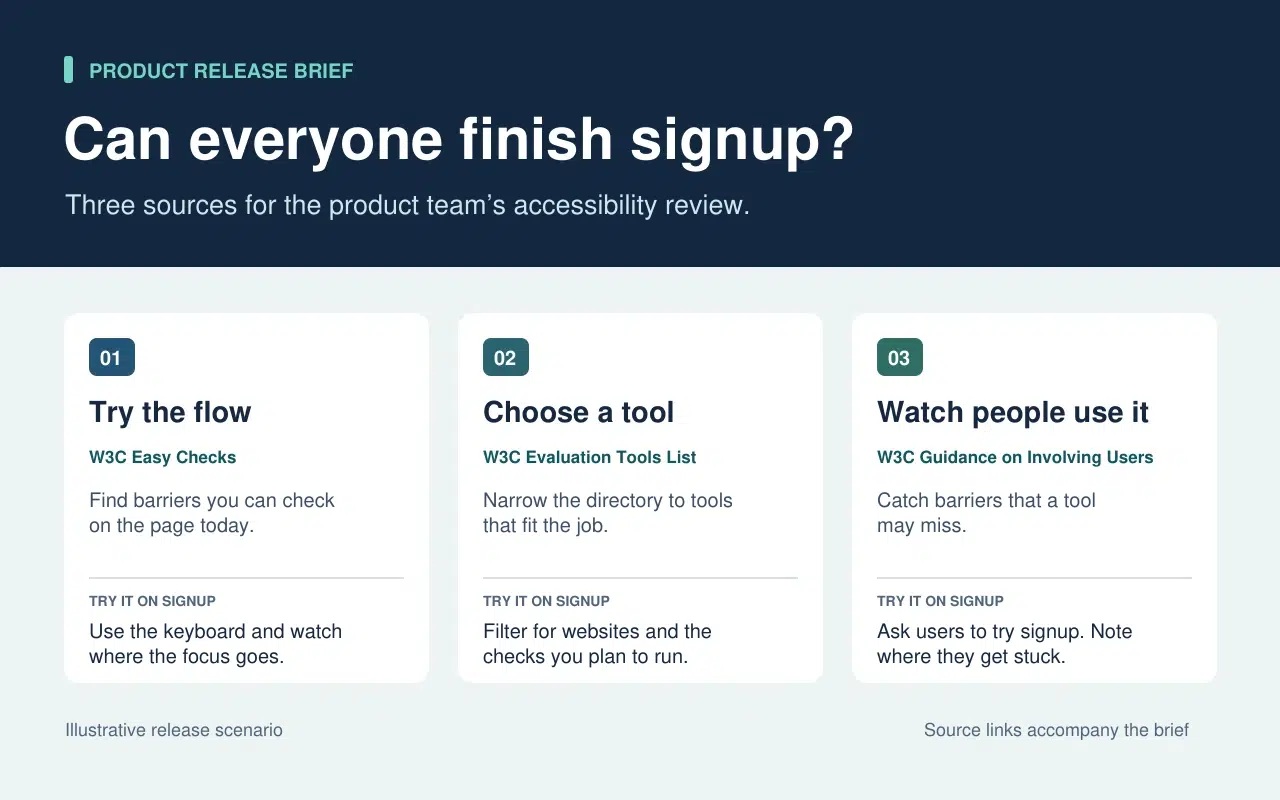
The release lead needs to know what the team can check today and what needs more time or help. That decision sets the order of the brief. Start with a keyboard check the team can run now. Then point to tools for anything that needs a closer look. Finish with the checks that require watching people use the form.
| What Goes Into the Brief | What Stays in the Source |
| A quick keyboard check from W3C Easy Checks. Start at the email field and press Tab. Record the last control you could identify if the focus indicator disappears. | The rest of the preliminary checks. Link to them so a teammate can use the full checklist in a broader review. |
| A link to the W3C evaluation tools directory beside the task that still needs a tool. | The full list of tools, which people can filter once they know what they need to test. |
| One action from the W3C guidance on involving users. Ask participants to go through signup and note the first step where they need help. | The full guidance on planning a user evaluation. Keep it available to the person running the session. |
The written brief gives each link a reason to be there. If a source doesn’t change what someone should check or do next, leave it in the research notes. That keeps the release brief short enough to use during the review.
Turn the Brief Into a Short Video With Recastia
Készíts videót azoknak a csapattársaknak, akik lemaradtak a kiadás áttekintéséről, vagy egy gyors magyarázatra van szükségük, mielőtt tesztelik az űrlapot. Az írásos összefoglalót őrizd meg a forráslinkekkel együtt. A videóban használd a narrációt, hogy rámutatj arra, amit valaki esetleg nem vesz észre az oldal átfuttatása során.
- Minden feladathoz külön oldalt rendelni
A leírás három sorát használva készíts egy háromoldalas PDF-et. Az első oldal megmutatja, hol kezdje a billentyűzet-ellenőrzést. A második oldalon a csapatnak fel kell sorolnia, hogy mit kell még tesztelnie egy eszköz kiválasztása előtt. Az utolsó oldalon elmagyarázzák, hogy mit kell rögzíteni, amikor valaki megpróbálja kitölteni a regisztrációs űrlapot. Ügyeljen arra, hogy minden oldal videóméretben is olvasható legyen. Egy utasítás és egy rövid példa elegendő.
- Adja hozzá a PDF-ben található magyarázatot a videóhoz
Upload the three-page brief to PDF-ből videóba and choose a template that keeps the instructions easy to read. In the page-by-page workflow, enter a line of narration for each page. On the keyboard page, say “Press Tab from the email field to Continue. If you lose track of the focus indicator, write down the last control you could see.” On the user session page, tell the team what to record when a participant asks for help.
- Tekintse meg a videót a mellette lévő összefoglalóval
Készítsd el a videót, és állj meg az első feladatnál. Győződj meg róla, hogy a képernyőn látható tevékenység megegyezik a narrációval, és hogy a feliratok olvashatóvá teszik az utasítást. Oszd meg a videót az írott leírás mellett. Egy csapattársad megtekintheti a bemutatót a tesztelés előtt, és azonnal az eredeti útmutatóhoz ugorhat, ha további részletekre van szüksége.
Three Public Examples and What to Borrow From Each
Make It Easy to Narrow a List
The W3C directory puts its filters before the tool entries. Readers can choose what they need to test before they browse names. In the release brief, borrow that idea by telling the team which check to run before you send them to the directory.
Put Evidence Where Readers Need It
The UK Parliament’s Heat Networks briefing opens with the findings. It then explains how buildings share a network before discussing where one would work, who pays for the pipes, and what customers experience. Borrow the sequence. Give the team enough context to understand the first check and put deeper evidence where it affects a decision.
Give Each Link Enough Context to Earn a Click
An issue of The Browser introduces a piece about cryptic crosswords and modernist poetry, then tells you it runs to 3,630 words. The description helps you decide whether it’s interesting. The word count helps you decide whether to read it now. In a work brief, a section name or a page number can do the same job. Tell a colleague where to look before they open a long report.
Gyakran Ismételt Kérdések
Először ellenőrizd a licenc- és felhasználási feltételeket. Ha az engedély nem egyértelmű, hivatkozz az eredetire, és saját szavaiddal magyarázd el a lényeges megállapítást. Tartsd meg a forrást, a dátumot és minden olyan kikötést, amely befolyásolja a táblázat jelentését.
Ellenőrizd, hogy mit mértek és mikor. Ha az eltérés megváltoztatja a csapat teendőit, mindkét megállapítást írd be a leírásba, és magyarázd el, hogy melyik környezetre vonatkozik. Add meg az olvasóknak az eredeti linkeket, hogy ellenőrizhessék a részleteket.
Mondd el, mit kell a nézőnek keresnie vagy tennie, amíg az oldal látható. Ha egy oldal már három lépést sorol fel, akkor beszéld el azt a lépést, ahol az emberek hajlamosak habozni. Próbáld ki hangosan a sort, mielőtt elkészíted a videót.
Tekintse át, amikor a feladat megváltozik. Regisztráció esetén frissítse a billentyűzetellenőrzést, ha az űrlap áthelyezi a Folytatás gombot, vagy új mezőt ad hozzá. Frissítse a PDF-et és az érintett videó narrációt együtt, hogy a két verzió ugyanazokat az utasításokat adja.
Következtetés
The content curation examples in this article show how much work one small editorial choice can save. A filter narrows a long list. A well-placed finding answers a question before readers have to dig for it.
Use these content curation examples on a brief your team already needs. Write one action beside each source, then make a short Recastia walkthrough for any check people need to hear explained. Keep the brief and its links beside the video so people can follow through.
Keltsd életre PDF-edet a Recastia segítségével
Hozz létre, szabj testre és oszd meg tartalmaidat egy lebilincselőbb módon.