
Your team is about to release a new signup form. You’ve found a guide, a directory of testing tools, and advice on involving users. Send all three links and everyone still has to figure out where to start. Send a short brief that opens with the first check, and a teammate can start right away.
Here’s how to choose the sources for that release brief and turn it into a short narrated video with Recastia. The three content curation examples later in the article show what to put on the page, what to leave behind a link, and when a little explanation helps. You can use the same content curation examples to plan a brief for your own team.
Choose What the Team Needs to See
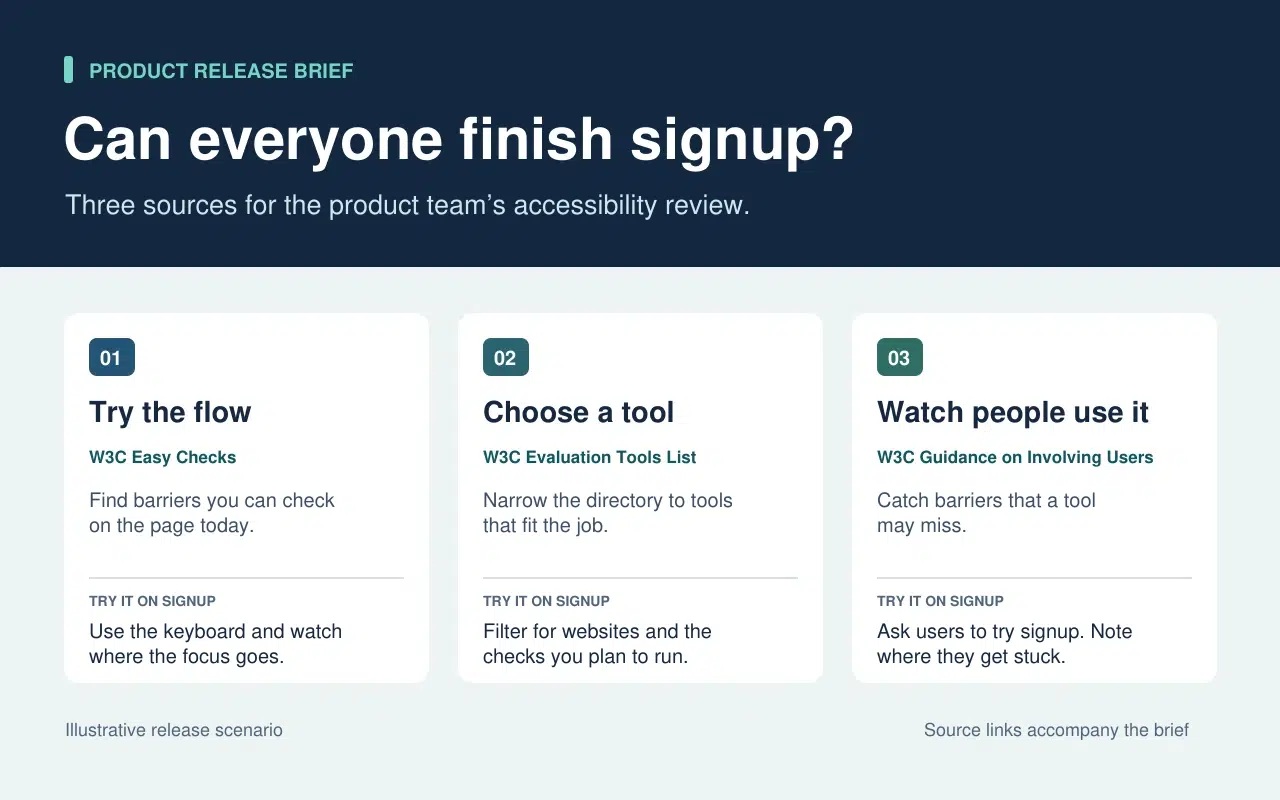
The release lead needs to know what the team can check today and what needs more time or help. That decision sets the order of the brief. Start with a keyboard check the team can run now. Then point to tools for anything that needs a closer look. Finish with the checks that require watching people use the form.
| What Goes Into the Brief | What Stays in the Source |
| A quick keyboard check from W3C Easy Checks. Start at the email field and press Tab. Record the last control you could identify if the focus indicator disappears. | The rest of the preliminary checks. Link to them so a teammate can use the full checklist in a broader review. |
| A link to the W3C evaluation tools directory beside the task that still needs a tool. | The full list of tools, which people can filter once they know what they need to test. |
| One action from the W3C guidance on involving users. Ask participants to go through signup and note the first step where they need help. | The full guidance on planning a user evaluation. Keep it available to the person running the session. |
The written brief gives each link a reason to be there. If a source doesn’t change what someone should check or do next, leave it in the research notes. That keeps the release brief short enough to use during the review.
Turn the Brief Into a Short Video With Recastia
Sürüm incelemesini kaçıran veya formu test etmeden önce hızlı bir açıklamaya ihtiyaç duyan ekip arkadaşlarınız için bir video hazırlayın. Yazılı metni kaynak bağlantılarıyla birlikte kısa tutun. Videoda, sayfayı tarayarak gözden kaçırabilecekleri noktaları seslendirme ile belirtin.
- Her göreve ayrı bir sayfa ayırın.
Özet metindeki üç satırı kullanarak üç sayfalık bir PDF oluşturun. İlk sayfa, klavye kontrolüne nereden başlanacağını gösterir. İkinci sayfa, ekibin bir araç seçmeden önce test etmesi gerekenleri listelemesini ister. Son sayfa ise birisi kayıt formunu denediğinde neyin kaydedilmesi gerektiğini açıklar. Her sayfanın video boyutunda okunabilir olmasına dikkat edin. Bir talimat ve kısa bir örnek yeterlidir.
- Açıklamayı PDF olarak videoya ekle
Upload the three-page brief to PDF'den Videoya and choose a template that keeps the instructions easy to read. In the page-by-page workflow, enter a line of narration for each page. On the keyboard page, say “Press Tab from the email field to Continue. If you lose track of the focus indicator, write down the last control you could see.” On the user session page, tell the team what to record when a participant asks for help.
- Videoyu yanındaki kısa açıklamayla birlikte önizleyin.
Videoyu oluşturun ve ilk görevde durdurun. Ekrandaki eylemin seslendirmeyle eşleştiğinden ve altyazıların talimatı okunabilir bıraktığından emin olun. Videoyu yazılı özetin yanına paylaşın. Bir ekip arkadaşınız test etmeden önce adım adım kılavuzu izleyebilir ve daha fazla ayrıntıya ihtiyaç duyduğunda doğrudan orijinal kılavuza gidebilir.
Three Public Examples and What to Borrow From Each
Make It Easy to Narrow a List
The W3C directory puts its filters before the tool entries. Readers can choose what they need to test before they browse names. In the release brief, borrow that idea by telling the team which check to run before you send them to the directory.
Put Evidence Where Readers Need It
The UK Parliament’s Heat Networks briefing opens with the findings. It then explains how buildings share a network before discussing where one would work, who pays for the pipes, and what customers experience. Borrow the sequence. Give the team enough context to understand the first check and put deeper evidence where it affects a decision.
Give Each Link Enough Context to Earn a Click
An issue of The Browser introduces a piece about cryptic crosswords and modernist poetry, then tells you it runs to 3,630 words. The description helps you decide whether it’s interesting. The word count helps you decide whether to read it now. In a work brief, a section name or a page number can do the same job. Tell a colleague where to look before they open a long report.
Sıkça Sorulan Sorular
Öncelikle lisans ve yeniden kullanım koşullarını kontrol edin. İzin net değilse, orijinal kaynağa bağlantı verin ve ilgili bulguyu kendi kelimelerinizle açıklayın. Kaynağı, tarihi ve grafiğin anlamını etkileyen tüm uyarıları koruyun.
Her birinin neyi ve ne zaman ölçtüğünü kontrol edin. Eğer fark, ekibin yapması gerekenleri değiştiriyorsa, her iki bulguyu da özete ekleyin ve her birinin hangi ortama uygulandığını açıklayın. Okuyuculara ayrıntıları kontrol edebilmeleri için orijinal bağlantıları verin.
Sayfa görünür haldeyken izleyicinin neye bakması veya ne yapması gerektiğini söyleyin. Eğer sayfada zaten üç adım listelenmişse, insanların tereddüt etme eğiliminde olduğu adımı açıklayın. Videoyu oluşturmadan önce bu cümleyi sesli olarak deneyin.
Görev değiştiğinde gözden geçirin. Kayıt incelemesi için, formda Devam düğmesinin yeri değiştiğinde veya yeni bir alan eklendiğinde klavye kontrolünü güncelleyin. PDF ve etkilenen video anlatımını birlikte güncelleyerek iki sürümün de aynı talimatları vermesini sağlayın.
Çözüm
The content curation examples in this article show how much work one small editorial choice can save. A filter narrows a long list. A well-placed finding answers a question before readers have to dig for it.
Use these content curation examples on a brief your team already needs. Write one action beside each source, then make a short Recastia walkthrough for any check people need to hear explained. Keep the brief and its links beside the video so people can follow through.
Recastia ile PDF dosyalarınıza hayat verin.
İçeriklerinizi daha ilgi çekici bir şekilde oluşturun, özelleştirin ve paylaşın.