
Your team is about to release a new signup form. You’ve found a guide, a directory of testing tools, and advice on involving users. Send all three links and everyone still has to figure out where to start. Send a short brief that opens with the first check, and a teammate can start right away.
Here’s how to choose the sources for that release brief and turn it into a short narrated video with Recastia. The three content curation examples later in the article show what to put on the page, what to leave behind a link, and when a little explanation helps. You can use the same content curation examples to plan a brief for your own team.
Choose What the Team Needs to See
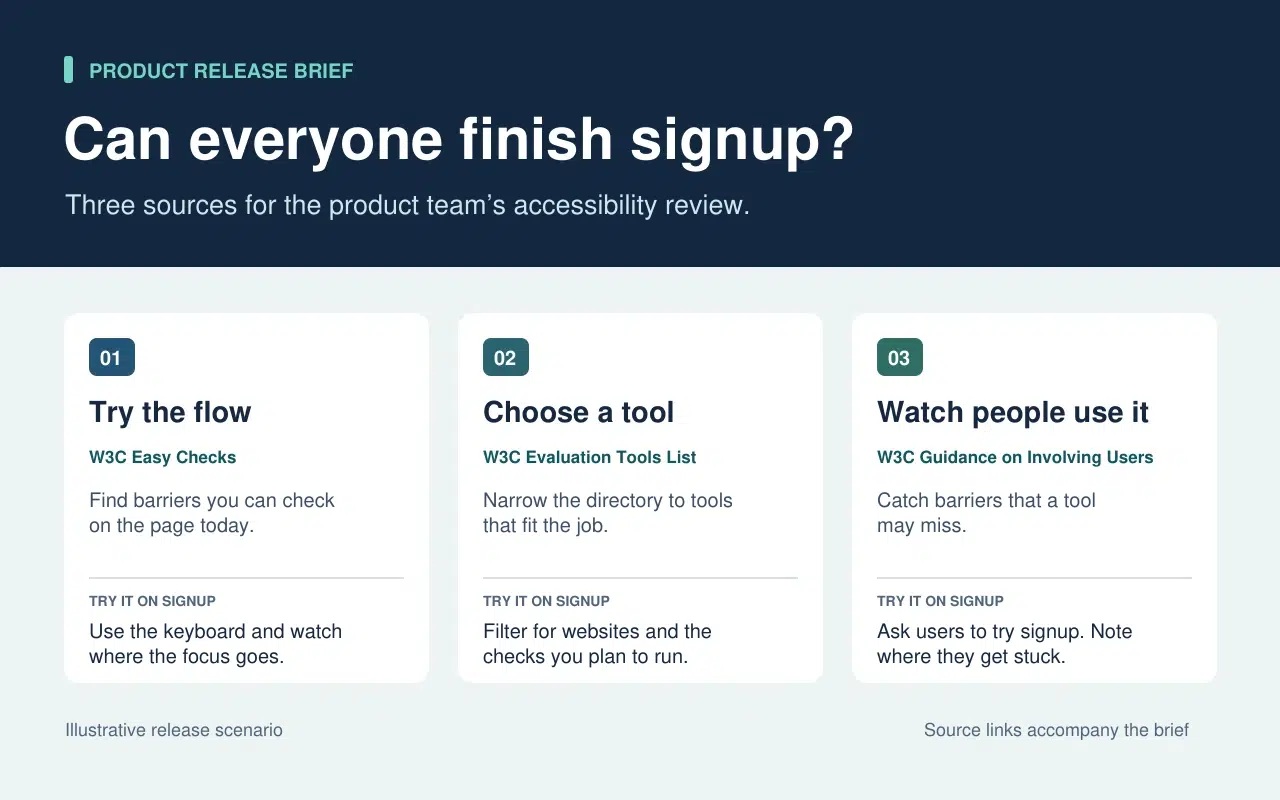
The release lead needs to know what the team can check today and what needs more time or help. That decision sets the order of the brief. Start with a keyboard check the team can run now. Then point to tools for anything that needs a closer look. Finish with the checks that require watching people use the form.
| What Goes Into the Brief | What Stays in the Source |
| A quick keyboard check from W3C Easy Checks. Start at the email field and press Tab. Record the last control you could identify if the focus indicator disappears. | The rest of the preliminary checks. Link to them so a teammate can use the full checklist in a broader review. |
| A link to the W3C evaluation tools directory beside the task that still needs a tool. | The full list of tools, which people can filter once they know what they need to test. |
| One action from the W3C guidance on involving users. Ask participants to go through signup and note the first step where they need help. | The full guidance on planning a user evaluation. Keep it available to the person running the session. |
The written brief gives each link a reason to be there. If a source doesn’t change what someone should check or do next, leave it in the research notes. That keeps the release brief short enough to use during the review.
Turn the Brief Into a Short Video With Recastia
Gör en video för lagkamrater som missade releasegranskningen eller behöver en snabb förklaring innan de testar formuläret. Spara den skriftliga sammanfattningen med dess källänkar. Använd berättarröst i videon för att påpeka vad någon kan missa genom att skanna sidan.
- Ge varje uppgift sin egen sida
Använd de tre raderna i briefen för att skapa en tresidig PDF. Den första sidan visar var tangentbordskontrollen ska börja. Den andra ber teamet att lista vad de fortfarande behöver testa innan de väljer ett verktyg. Den sista förklarar vad som ska registreras när någon provar registreringsformuläret. Se till att varje sida är läsbar i videostorlek. En instruktion och ett kort exempel räcker.
- Lägg till förklaringen i PDF till video
Upload the three-page brief to PDF till video and choose a template that keeps the instructions easy to read. In the page-by-page workflow, enter a line of narration for each page. On the keyboard page, say “Press Tab from the email field to Continue. If you lose track of the focus indicator, write down the last control you could see.” On the user session page, tell the team what to record when a participant asks for help.
- Förhandsgranska videon med sammanfattningen bredvid
Generera videon och pausa vid den första uppgiften. Se till att handlingen på skärmen matchar berättarröst och att textningen gör instruktionerna läsbara. Dela videon bredvid den skriftliga beskrivningen. En lagkamrat kan titta på genomgången innan testet och gå direkt till den ursprungliga vägledningen när de behöver mer information.
Three Public Examples and What to Borrow From Each
Make It Easy to Narrow a List
The W3C directory puts its filters before the tool entries. Readers can choose what they need to test before they browse names. In the release brief, borrow that idea by telling the team which check to run before you send them to the directory.
Put Evidence Where Readers Need It
The UK Parliament’s Heat Networks briefing opens with the findings. It then explains how buildings share a network before discussing where one would work, who pays for the pipes, and what customers experience. Borrow the sequence. Give the team enough context to understand the first check and put deeper evidence where it affects a decision.
Give Each Link Enough Context to Earn a Click
An issue of The Browser introduces a piece about cryptic crosswords and modernist poetry, then tells you it runs to 3,630 words. The description helps you decide whether it’s interesting. The word count helps you decide whether to read it now. In a work brief, a section name or a page number can do the same job. Tell a colleague where to look before they open a long report.
Vanliga frågor
Kontrollera licens- och återanvändningsvillkoren först. Om tillståndet är oklart, länka till originalet och förklara det relevanta fyndet med dina egna ord. Behåll källan, datumet och eventuella förbehåll som påverkar diagrammets betydelse.
Kontrollera vad var och en mätte och när. Om skillnaden förändrar vad teamet ska göra, lägg till båda resultaten i sammanfattningen och förklara vilken miljö var och en gäller för. Ge läsarna de ursprungliga länkarna så att de kan kontrollera detaljerna.
Säg vad tittaren behöver leta efter eller göra medan sidan är synlig. Om en sida redan listar tre steg, diskutera igenom steget där folk tenderar att tveka. Testa repliken högt innan du genererar videon.
Granska det när uppgiften ändras. För en registreringsgranskning, uppdatera tangentbordet och kontrollera om formuläret flyttar knappen Fortsätt eller lägger till ett nytt fält. Uppdatera PDF-filen och den berörda videoberättelsen tillsammans så att de två versionerna ger samma instruktioner.
Slutsats
The content curation examples in this article show how much work one small editorial choice can save. A filter narrows a long list. A well-placed finding answers a question before readers have to dig for it.
Use these content curation examples on a brief your team already needs. Write one action beside each source, then make a short Recastia walkthrough for any check people need to hear explained. Keep the brief and its links beside the video so people can follow through.
Få liv i din PDF med Recastia
Skapa, anpassa och dela ditt innehåll på ett mer engagerande sätt.