
Your team is about to release a new signup form. You’ve found a guide, a directory of testing tools, and advice on involving users. Send all three links and everyone still has to figure out where to start. Send a short brief that opens with the first check, and a teammate can start right away.
Here’s how to choose the sources for that release brief and turn it into a short narrated video with Recastia. The three content curation examples later in the article show what to put on the page, what to leave behind a link, and when a little explanation helps. You can use the same content curation examples to plan a brief for your own team.
Choose What the Team Needs to See
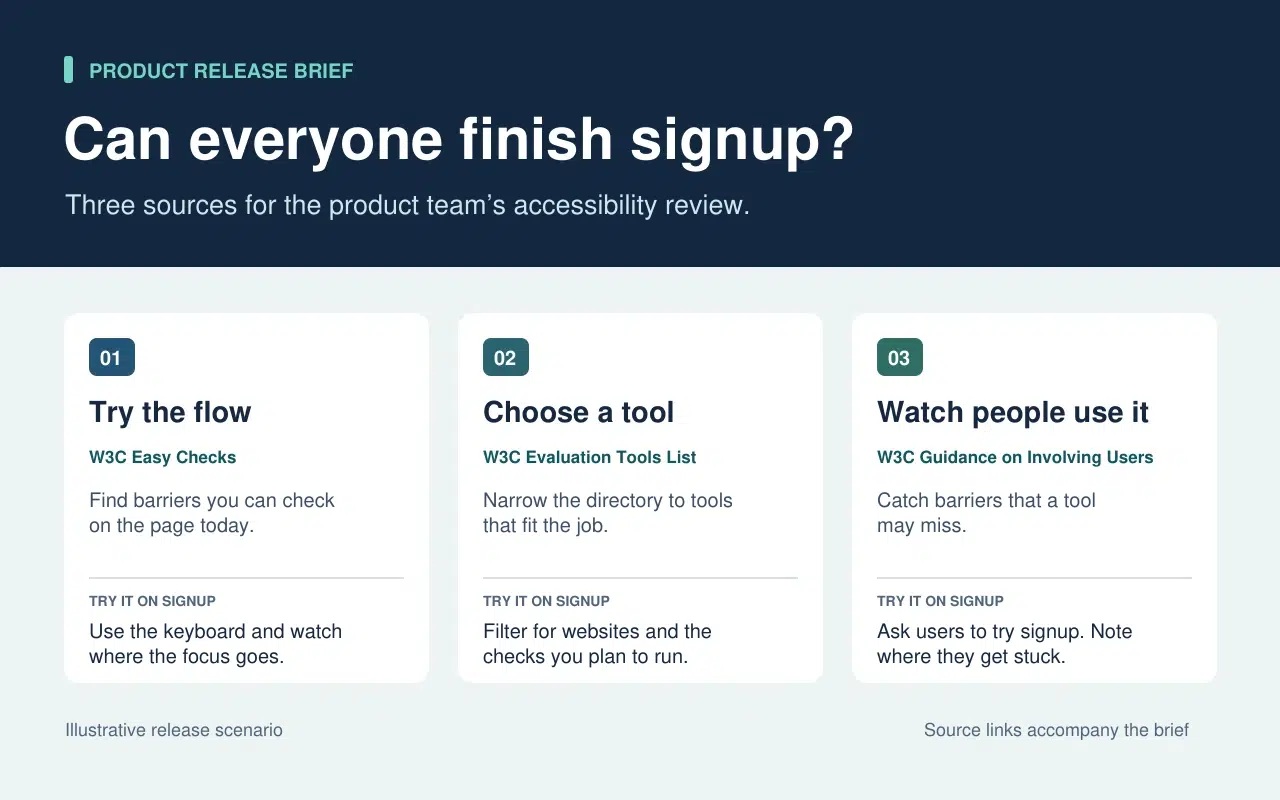
The release lead needs to know what the team can check today and what needs more time or help. That decision sets the order of the brief. Start with a keyboard check the team can run now. Then point to tools for anything that needs a closer look. Finish with the checks that require watching people use the form.
| What Goes Into the Brief | What Stays in the Source |
| A quick keyboard check from W3C Easy Checks. Start at the email field and press Tab. Record the last control you could identify if the focus indicator disappears. | The rest of the preliminary checks. Link to them so a teammate can use the full checklist in a broader review. |
| A link to the W3C evaluation tools directory beside the task that still needs a tool. | The full list of tools, which people can filter once they know what they need to test. |
| One action from the W3C guidance on involving users. Ask participants to go through signup and note the first step where they need help. | The full guidance on planning a user evaluation. Keep it available to the person running the session. |
The written brief gives each link a reason to be there. If a source doesn’t change what someone should check or do next, leave it in the research notes. That keeps the release brief short enough to use during the review.
Turn the Brief Into a Short Video With Recastia
Buat video untuk rekan tim yang melewatkan tinjauan rilis atau membutuhkan penjelasan singkat sebelum mereka menguji formulir. Sertakan ringkasan tertulis beserta tautan sumbernya. Dalam video, gunakan narasi suara untuk menunjukkan hal-hal yang mungkin terlewatkan oleh seseorang saat memindai halaman.
- Berikan setiap tugas halaman tersendiri.
Gunakan tiga baris dalam brief untuk membuat PDF tiga halaman. Halaman pertama menunjukkan di mana harus memulai pengecekan keyboard. Halaman kedua meminta tim untuk mencantumkan apa yang masih perlu diuji sebelum memilih alat. Halaman terakhir menjelaskan apa yang perlu direkam ketika seseorang mencoba formulir pendaftaran. Pastikan setiap halaman mudah dibaca dengan ukuran video. Satu instruksi dan satu contoh singkat sudah cukup.
- Tambahkan Penjelasan dalam Format PDF ke Video
Upload the three-page brief to Konversi PDF ke Video and choose a template that keeps the instructions easy to read. In the page-by-page workflow, enter a line of narration for each page. On the keyboard page, say “Press Tab from the email field to Continue. If you lose track of the focus indicator, write down the last control you could see.” On the user session page, tell the team what to record when a participant asks for help.
- Pratinjau Video dengan Penjelasan Singkat di Sampingnya
Buat video dan jeda pada tugas pertama. Pastikan aksi di layar sesuai dengan narasi suara dan teks keterangan membuat instruksi tetap mudah dibaca. Bagikan video tersebut bersamaan dengan panduan tertulis. Rekan tim dapat menonton panduan langkah demi langkah sebelum pengujian dan langsung merujuk ke panduan asli jika membutuhkan detail lebih lanjut.
Three Public Examples and What to Borrow From Each
Make It Easy to Narrow a List
The W3C directory puts its filters before the tool entries. Readers can choose what they need to test before they browse names. In the release brief, borrow that idea by telling the team which check to run before you send them to the directory.
Put Evidence Where Readers Need It
The UK Parliament’s Heat Networks briefing opens with the findings. It then explains how buildings share a network before discussing where one would work, who pays for the pipes, and what customers experience. Borrow the sequence. Give the team enough context to understand the first check and put deeper evidence where it affects a decision.
Give Each Link Enough Context to Earn a Click
An issue of The Browser introduces a piece about cryptic crosswords and modernist poetry, then tells you it runs to 3,630 words. The description helps you decide whether it’s interesting. The word count helps you decide whether to read it now. In a work brief, a section name or a page number can do the same job. Tell a colleague where to look before they open a long report.
Pertanyaan yang Sering Diajukan
Periksa terlebih dahulu lisensi dan ketentuan penggunaan kembali. Jika izinnya tidak jelas, tautkan ke sumber aslinya dan jelaskan temuan yang relevan dengan kata-kata Anda sendiri. Pertahankan sumber, tanggal, dan peringatan apa pun yang memengaruhi arti grafik tersebut.
Periksa apa yang diukur oleh masing-masing metode dan kapan. Jika perbedaan tersebut mengubah apa yang harus dilakukan tim, cantumkan kedua temuan tersebut dalam laporan singkat dan jelaskan konteks mana yang berlaku untuk masing-masing metode. Berikan tautan asli kepada pembaca agar mereka dapat memeriksa detailnya.
Sebutkan apa yang perlu dicari atau dilakukan oleh pemirsa saat halaman tersebut terlihat. Jika halaman tersebut sudah mencantumkan tiga langkah, jelaskan langkah yang cenderung membuat orang ragu-ragu. Coba ucapkan kalimat tersebut dengan lantang sebelum Anda membuat video.
Tinjau kembali saat tugas berubah. Untuk tinjauan pendaftaran, perbarui pemeriksaan keyboard jika formulir memindahkan tombol Lanjutkan atau menambahkan bidang baru. Perbarui PDF dan narasi video yang terkait secara bersamaan agar kedua versi memberikan instruksi yang sama.
Kesimpulan
The content curation examples in this article show how much work one small editorial choice can save. A filter narrows a long list. A well-placed finding answers a question before readers have to dig for it.
Use these content curation examples on a brief your team already needs. Write one action beside each source, then make a short Recastia walkthrough for any check people need to hear explained. Keep the brief and its links beside the video so people can follow through.
Hidupkan PDF Anda dengan Recastia
Buat, sesuaikan, dan bagikan konten Anda dengan cara yang lebih menarik.