
Your team is about to release a new signup form. You’ve found a guide, a directory of testing tools, and advice on involving users. Send all three links and everyone still has to figure out where to start. Send a short brief that opens with the first check, and a teammate can start right away.
Here’s how to choose the sources for that release brief and turn it into a short narrated video with Recastia. The three content curation examples later in the article show what to put on the page, what to leave behind a link, and when a little explanation helps. You can use the same content curation examples to plan a brief for your own team.
Choose What the Team Needs to See
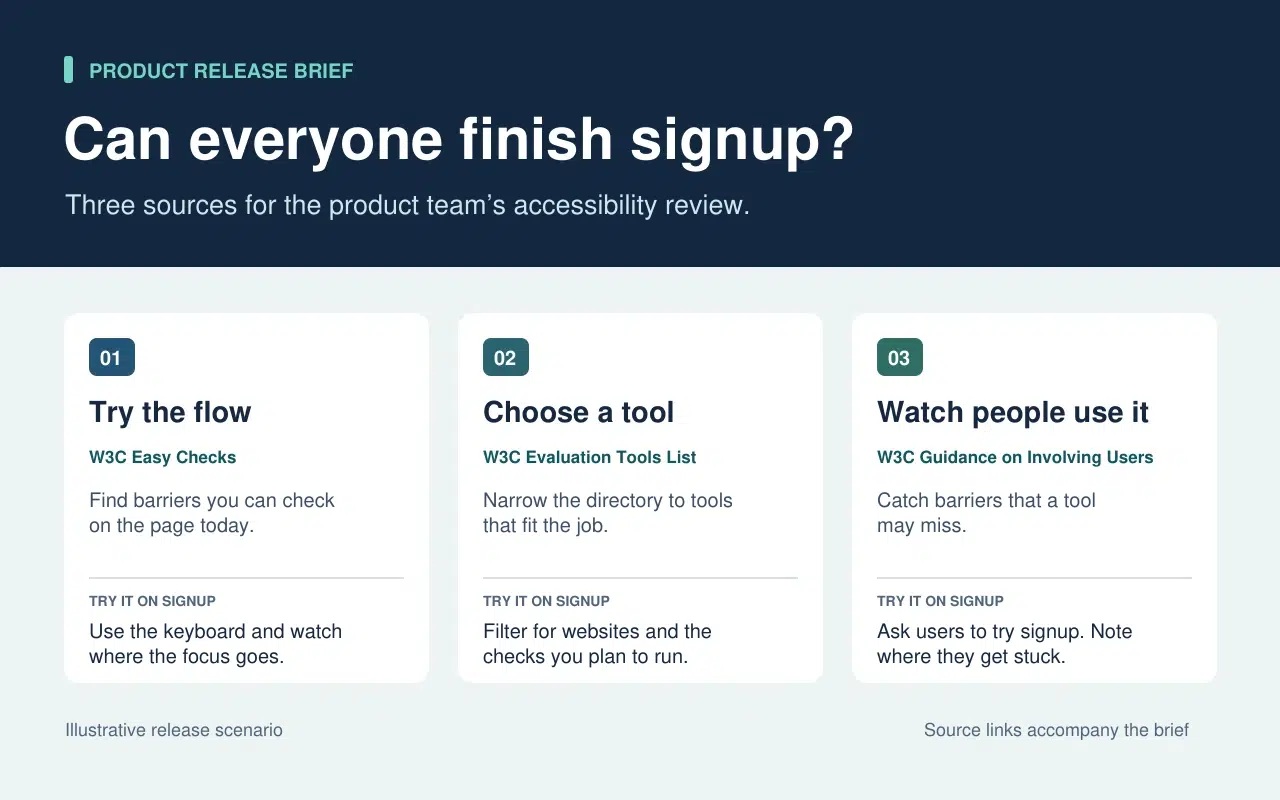
The release lead needs to know what the team can check today and what needs more time or help. That decision sets the order of the brief. Start with a keyboard check the team can run now. Then point to tools for anything that needs a closer look. Finish with the checks that require watching people use the form.
| What Goes Into the Brief | What Stays in the Source |
| A quick keyboard check from W3C Easy Checks. Start at the email field and press Tab. Record the last control you could identify if the focus indicator disappears. | The rest of the preliminary checks. Link to them so a teammate can use the full checklist in a broader review. |
| A link to the W3C evaluation tools directory beside the task that still needs a tool. | The full list of tools, which people can filter once they know what they need to test. |
| One action from the W3C guidance on involving users. Ask participants to go through signup and note the first step where they need help. | The full guidance on planning a user evaluation. Keep it available to the person running the session. |
The written brief gives each link a reason to be there. If a source doesn’t change what someone should check or do next, leave it in the research notes. That keeps the release brief short enough to use during the review.
Turn the Brief Into a Short Video With Recastia
Hãy làm một video cho các thành viên nhóm, những người đã bỏ lỡ buổi xem xét bản phát hành hoặc cần giải thích nhanh trước khi họ thử nghiệm biểu mẫu. Giữ nguyên bản tóm tắt bằng văn bản kèm theo các liên kết nguồn. Trong video, hãy sử dụng giọng nói thuyết minh để chỉ ra những điểm mà người xem có thể bỏ sót khi chỉ lướt qua trang.
- Mỗi nhiệm vụ được trình bày trên một trang riêng.
Sử dụng ba dòng trong bản tóm tắt để tạo một tệp PDF ba trang. Trang đầu tiên hướng dẫn cách bắt đầu kiểm tra bàn phím. Trang thứ hai yêu cầu nhóm liệt kê những gì cần kiểm tra thêm trước khi chọn công cụ. Trang cuối cùng giải thích những gì cần ghi lại khi ai đó thử điền vào biểu mẫu đăng ký. Giữ cho mỗi trang có kích thước dễ đọc ở chế độ video. Một hướng dẫn và một ví dụ ngắn là đủ.
- Thêm phần giải thích dưới dạng PDF vào video.
Upload the three-page brief to Chuyển đổi PDF sang Video and choose a template that keeps the instructions easy to read. In the page-by-page workflow, enter a line of narration for each page. On the keyboard page, say “Press Tab from the email field to Continue. If you lose track of the focus indicator, write down the last control you could see.” On the user session page, tell the team what to record when a participant asks for help.
- Xem trước video kèm theo bản tóm tắt bên cạnh.
Tạo video và tạm dừng ở nhiệm vụ đầu tiên. Đảm bảo hành động trên màn hình khớp với lời thuyết minh và phụ đề giúp hướng dẫn dễ đọc. Chia sẻ video bên cạnh bản tóm tắt bằng văn bản. Đồng đội có thể xem hướng dẫn trước khi thử nghiệm và xem lại hướng dẫn gốc khi cần thêm chi tiết.
Three Public Examples and What to Borrow From Each
Make It Easy to Narrow a List
The W3C directory puts its filters before the tool entries. Readers can choose what they need to test before they browse names. In the release brief, borrow that idea by telling the team which check to run before you send them to the directory.
Put Evidence Where Readers Need It
The UK Parliament’s Heat Networks briefing opens with the findings. It then explains how buildings share a network before discussing where one would work, who pays for the pipes, and what customers experience. Borrow the sequence. Give the team enough context to understand the first check and put deeper evidence where it affects a decision.
Give Each Link Enough Context to Earn a Click
An issue of The Browser introduces a piece about cryptic crosswords and modernist poetry, then tells you it runs to 3,630 words. The description helps you decide whether it’s interesting. The word count helps you decide whether to read it now. In a work brief, a section name or a page number can do the same job. Tell a colleague where to look before they open a long report.
Câu hỏi thường gặp
Trước tiên, hãy kiểm tra điều khoản cấp phép và sử dụng lại. Nếu quyền sử dụng không rõ ràng, hãy liên kết đến nguồn gốc và giải thích phát hiện liên quan bằng lời văn của riêng bạn. Giữ nguyên nguồn, ngày tháng và bất kỳ lưu ý nào ảnh hưởng đến ý nghĩa của biểu đồ.
Kiểm tra xem mỗi chỉ số đo lường cái gì và khi nào. Nếu sự khác biệt làm thay đổi những việc nhóm nên làm, hãy đưa cả hai kết quả vào bản tóm tắt và giải thích mỗi kết quả áp dụng cho trường hợp nào. Cung cấp cho người đọc các liên kết gốc để họ có thể kiểm tra chi tiết.
Hãy nói rõ người xem cần tìm kiếm hoặc thực hiện thao tác gì khi trang hiển thị. Nếu trang đã liệt kê ba bước, hãy nói rõ bước mà người xem thường do dự. Hãy thử nói to câu đó trước khi tạo video.
Hãy xem lại khi nhiệm vụ thay đổi. Đối với việc xem lại quy trình đăng ký, hãy cập nhật kiểm tra bàn phím nếu biểu mẫu di chuyển nút Tiếp tục hoặc thêm trường mới. Cập nhật đồng thời tệp PDF và phần thuyết minh video bị ảnh hưởng để hai phiên bản đưa ra cùng một hướng dẫn.
Phần kết luận
The content curation examples in this article show how much work one small editorial choice can save. A filter narrows a long list. A well-placed finding answers a question before readers have to dig for it.
Use these content curation examples on a brief your team already needs. Write one action beside each source, then make a short Recastia walkthrough for any check people need to hear explained. Keep the brief and its links beside the video so people can follow through.
Biến file PDF của bạn trở nên sống động với Recastia!
Tạo, tùy chỉnh và chia sẻ nội dung của bạn theo cách hấp dẫn hơn.