
Your team is about to release a new signup form. You’ve found a guide, a directory of testing tools, and advice on involving users. Send all three links and everyone still has to figure out where to start. Send a short brief that opens with the first check, and a teammate can start right away.
Here’s how to choose the sources for that release brief and turn it into a short narrated video with Recastia. The three content curation examples later in the article show what to put on the page, what to leave behind a link, and when a little explanation helps. You can use the same content curation examples to plan a brief for your own team.
Choose What the Team Needs to See
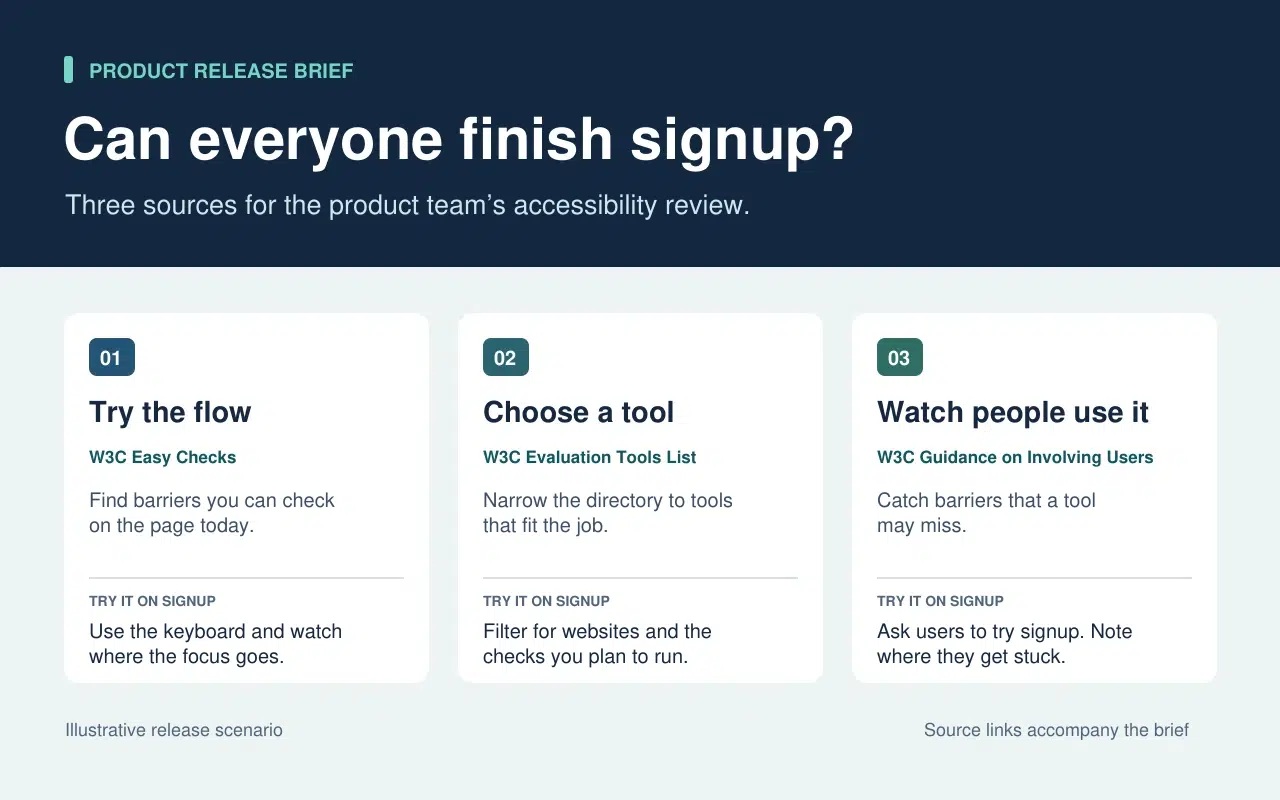
The release lead needs to know what the team can check today and what needs more time or help. That decision sets the order of the brief. Start with a keyboard check the team can run now. Then point to tools for anything that needs a closer look. Finish with the checks that require watching people use the form.
| What Goes Into the Brief | What Stays in the Source |
| A quick keyboard check from W3C Easy Checks. Start at the email field and press Tab. Record the last control you could identify if the focus indicator disappears. | The rest of the preliminary checks. Link to them so a teammate can use the full checklist in a broader review. |
| A link to the W3C evaluation tools directory beside the task that still needs a tool. | The full list of tools, which people can filter once they know what they need to test. |
| One action from the W3C guidance on involving users. Ask participants to go through signup and note the first step where they need help. | The full guidance on planning a user evaluation. Keep it available to the person running the session. |
The written brief gives each link a reason to be there. If a source doesn’t change what someone should check or do next, leave it in the research notes. That keeps the release brief short enough to use during the review.
Turn the Brief Into a Short Video With Recastia
Maak een video voor teamleden die de release-review hebben gemist of een korte uitleg nodig hebben voordat ze het formulier testen. Houd de schriftelijke samenvatting kort en bondig, inclusief de bronvermeldingen. Gebruik in de video de voice-over om aan te geven wat iemand mogelijk over het hoofd ziet bij het vluchtig lezen van de pagina.
- Geef elke taak een eigen pagina.
Gebruik de drie rijen in de briefing om een PDF van drie pagina's te maken. De eerste pagina laat zien waar de toetsenbordcontrole moet beginnen. Op de tweede pagina wordt het team gevraagd een lijst te maken van wat er nog getest moet worden voordat een tool gekozen wordt. De laatste pagina legt uit wat er vastgelegd moet worden wanneer iemand het aanmeldformulier invult. Zorg ervoor dat elke pagina leesbaar is op videoformaat. Eén instructie en een kort voorbeeld zijn voldoende.
- Voeg de uitleg in PDF-formaat toe aan de video.
Upload the three-page brief to PDF naar video and choose a template that keeps the instructions easy to read. In the page-by-page workflow, enter a line of narration for each page. On the keyboard page, say “Press Tab from the email field to Continue. If you lose track of the focus indicator, write down the last control you could see.” On the user session page, tell the team what to record when a participant asks for help.
- Bekijk de video met de bijbehorende beschrijving.
Genereer de video en pauzeer bij de eerste taak. Zorg ervoor dat de actie op het scherm overeenkomt met de gesproken tekst en dat de ondertiteling de instructie leesbaar laat. Deel de video naast de schriftelijke handleiding. Een teamlid kan de instructievideo bekijken voordat hij of zij gaat testen en kan direct de originele handleiding raadplegen als er meer details nodig zijn.
Three Public Examples and What to Borrow From Each
Make It Easy to Narrow a List
The W3C directory puts its filters before the tool entries. Readers can choose what they need to test before they browse names. In the release brief, borrow that idea by telling the team which check to run before you send them to the directory.
Put Evidence Where Readers Need It
The UK Parliament’s Heat Networks briefing opens with the findings. It then explains how buildings share a network before discussing where one would work, who pays for the pipes, and what customers experience. Borrow the sequence. Give the team enough context to understand the first check and put deeper evidence where it affects a decision.
Give Each Link Enough Context to Earn a Click
An issue of The Browser introduces a piece about cryptic crosswords and modernist poetry, then tells you it runs to 3,630 words. The description helps you decide whether it’s interesting. The word count helps you decide whether to read it now. In a work brief, a section name or a page number can do the same job. Tell a colleague where to look before they open a long report.
Veelgestelde vragen
Controleer eerst de licentie- en hergebruiksvoorwaarden. Als de toestemming onduidelijk is, link dan naar het origineel en leg de relevante bevinding in eigen woorden uit. Vermeld de bron, de datum en eventuele voorbehouden die van invloed zijn op de betekenis van de grafiek.
Controleer wat er precies is gemeten en wanneer. Als het verschil van invloed is op de aanpak van het team, neem dan beide bevindingen op in de briefing en leg uit op welke situatie ze van toepassing zijn. Geef lezers de originele links zodat ze de details kunnen controleren.
Leg uit waar de kijker op moet letten of wat hij moet doen terwijl de pagina zichtbaar is. Als er op een pagina al drie stappen staan, bespreek dan de stap waar mensen vaak aarzelen. Oefen de zin hardop voordat je de video maakt.
Controleer het document wanneer de taak verandert. Bij een controle van de aanmelding, moet u de toetsenbordcontrole bijwerken als de knop 'Doorgaan' in het formulier wordt verplaatst of als er een nieuw veld wordt toegevoegd. Werk de PDF en de bijbehorende video-commentaar samen bij, zodat beide versies dezelfde instructies bevatten.
Conclusie
The content curation examples in this article show how much work one small editorial choice can save. A filter narrows a long list. A well-placed finding answers a question before readers have to dig for it.
Use these content curation examples on a brief your team already needs. Write one action beside each source, then make a short Recastia walkthrough for any check people need to hear explained. Keep the brief and its links beside the video so people can follow through.
Breng je PDF tot leven met Recastia
Maak, pas aan en deel je content op een aantrekkelijkere manier.