
Your team is about to release a new signup form. You’ve found a guide, a directory of testing tools, and advice on involving users. Send all three links and everyone still has to figure out where to start. Send a short brief that opens with the first check, and a teammate can start right away.
Here’s how to choose the sources for that release brief and turn it into a short narrated video with Recastia. The three content curation examples later in the article show what to put on the page, what to leave behind a link, and when a little explanation helps. You can use the same content curation examples to plan a brief for your own team.
Choose What the Team Needs to See
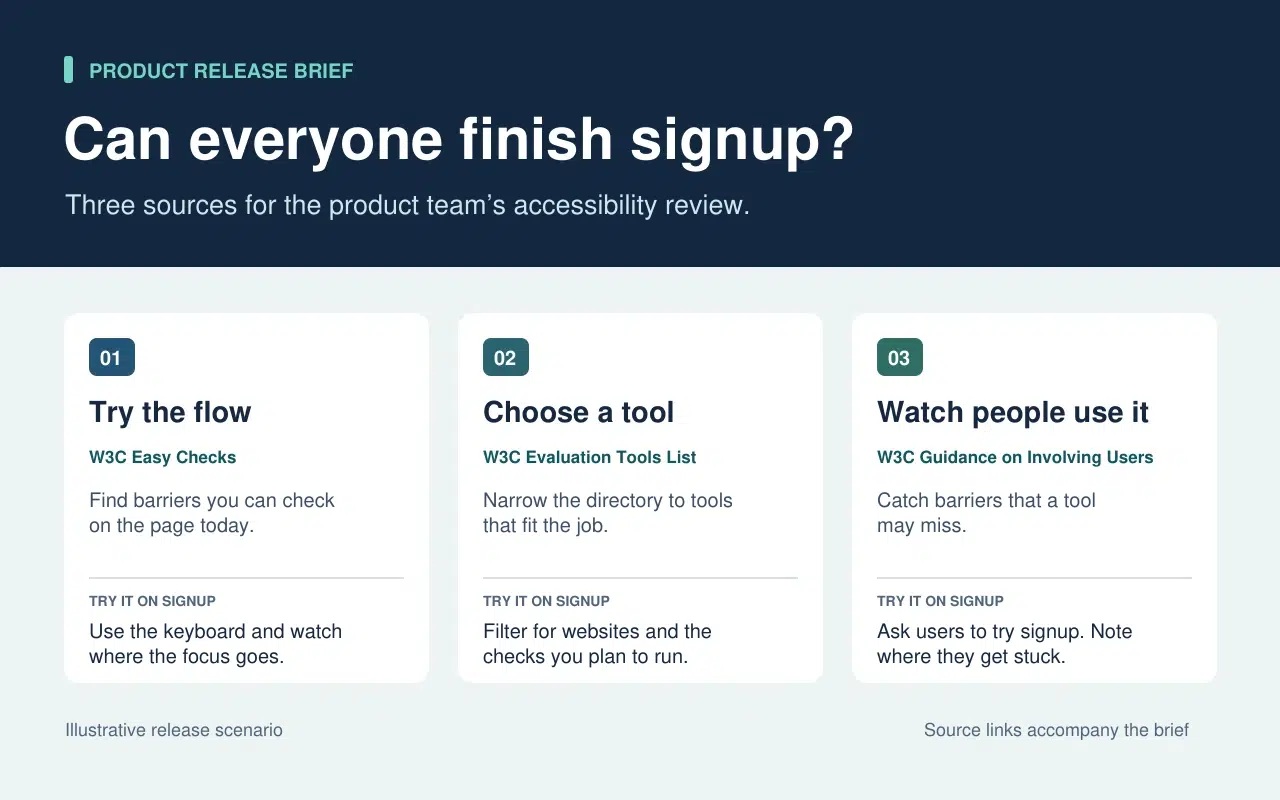
The release lead needs to know what the team can check today and what needs more time or help. That decision sets the order of the brief. Start with a keyboard check the team can run now. Then point to tools for anything that needs a closer look. Finish with the checks that require watching people use the form.
| What Goes Into the Brief | What Stays in the Source |
| A quick keyboard check from W3C Easy Checks. Start at the email field and press Tab. Record the last control you could identify if the focus indicator disappears. | The rest of the preliminary checks. Link to them so a teammate can use the full checklist in a broader review. |
| A link to the W3C evaluation tools directory beside the task that still needs a tool. | The full list of tools, which people can filter once they know what they need to test. |
| One action from the W3C guidance on involving users. Ask participants to go through signup and note the first step where they need help. | The full guidance on planning a user evaluation. Keep it available to the person running the session. |
The written brief gives each link a reason to be there. If a source doesn’t change what someone should check or do next, leave it in the research notes. That keeps the release brief short enough to use during the review.
Turn the Brief Into a Short Video With Recastia
Créez une vidéo pour les membres de l'équipe qui ont manqué la revue de version ou qui ont besoin d'une brève explication avant de tester le formulaire. Conservez le résumé écrit avec ses liens sources. Dans la vidéo, utilisez la voix off pour souligner les points qui pourraient échapper à un utilisateur qui parcourt rapidement la page.
- Attribuez à chaque tâche sa propre page
Utilisez les trois lignes du brief pour créer un PDF de trois pages. La première page indique par où commencer le test du clavier. La deuxième demande à l'équipe de lister les éléments à tester avant de choisir un outil. La dernière explique ce qu'il faut enregistrer lorsqu'une personne tente de remplir le formulaire d'inscription. Veillez à ce que chaque page soit lisible à la taille d'une vidéo. Une instruction et un court exemple suffisent.
- Ajouter l'explication au format PDF à la vidéo
Upload the three-page brief to PDF vers vidéo and choose a template that keeps the instructions easy to read. In the page-by-page workflow, enter a line of narration for each page. On the keyboard page, say “Press Tab from the email field to Continue. If you lose track of the focus indicator, write down the last control you could see.” On the user session page, tell the team what to record when a participant asks for help.
- Visionnez la vidéo en avant-première grâce au bref résumé ci-contre.
Générez la vidéo et mettez-la en pause sur la première tâche. Assurez-vous que l'action à l'écran corresponde à la voix off et que les sous-titres permettent de lire les instructions. Partagez la vidéo à côté du document écrit. Un membre de l'équipe pourra ainsi visionner la démonstration avant de procéder aux tests et consulter directement le guide original s'il a besoin de plus de détails.
Three Public Examples and What to Borrow From Each
Make It Easy to Narrow a List
The W3C directory puts its filters before the tool entries. Readers can choose what they need to test before they browse names. In the release brief, borrow that idea by telling the team which check to run before you send them to the directory.
Put Evidence Where Readers Need It
The UK Parliament’s Heat Networks briefing opens with the findings. It then explains how buildings share a network before discussing where one would work, who pays for the pipes, and what customers experience. Borrow the sequence. Give the team enough context to understand the first check and put deeper evidence where it affects a decision.
Give Each Link Enough Context to Earn a Click
An issue of The Browser introduces a piece about cryptic crosswords and modernist poetry, then tells you it runs to 3,630 words. The description helps you decide whether it’s interesting. The word count helps you decide whether to read it now. In a work brief, a section name or a page number can do the same job. Tell a colleague where to look before they open a long report.
Foire aux questions
Vérifiez d'abord les conditions de licence et de réutilisation. Si l'autorisation n'est pas claire, indiquez le lien vers la source originale et expliquez le résultat pertinent dans vos propres mots. Conservez la source, la date et toute mise en garde qui influence l'interprétation du graphique.
Vérifiez les données mesurées et leur date. Si la différence modifie les actions de l'équipe, intégrez les deux résultats dans le rapport et précisez le contexte auquel chacun s'applique. Fournissez aux lecteurs les liens vers les données originales pour qu'ils puissent consulter les détails.
Indiquez clairement ce que le spectateur doit rechercher ou faire pendant que la page est visible. Si une page liste déjà trois étapes, détaillez celle qui pose souvent problème. Répétez votre phrase à voix haute avant de générer la vidéo.
Vérifiez-le lorsque la tâche change. Pour une vérification d'inscription, mettez à jour la vérification du clavier si le formulaire déplace le bouton Continuer ou ajoute un nouveau champ. Mettez à jour simultanément le PDF et la narration vidéo concernée afin que les deux versions donnent les mêmes instructions.
Conclusion
The content curation examples in this article show how much work one small editorial choice can save. A filter narrows a long list. A well-placed finding answers a question before readers have to dig for it.
Use these content curation examples on a brief your team already needs. Write one action beside each source, then make a short Recastia walkthrough for any check people need to hear explained. Keep the brief and its links beside the video so people can follow through.
Donnez vie à vos PDF avec Recastia
Créez, personnalisez et partagez votre contenu de manière plus attrayante.