
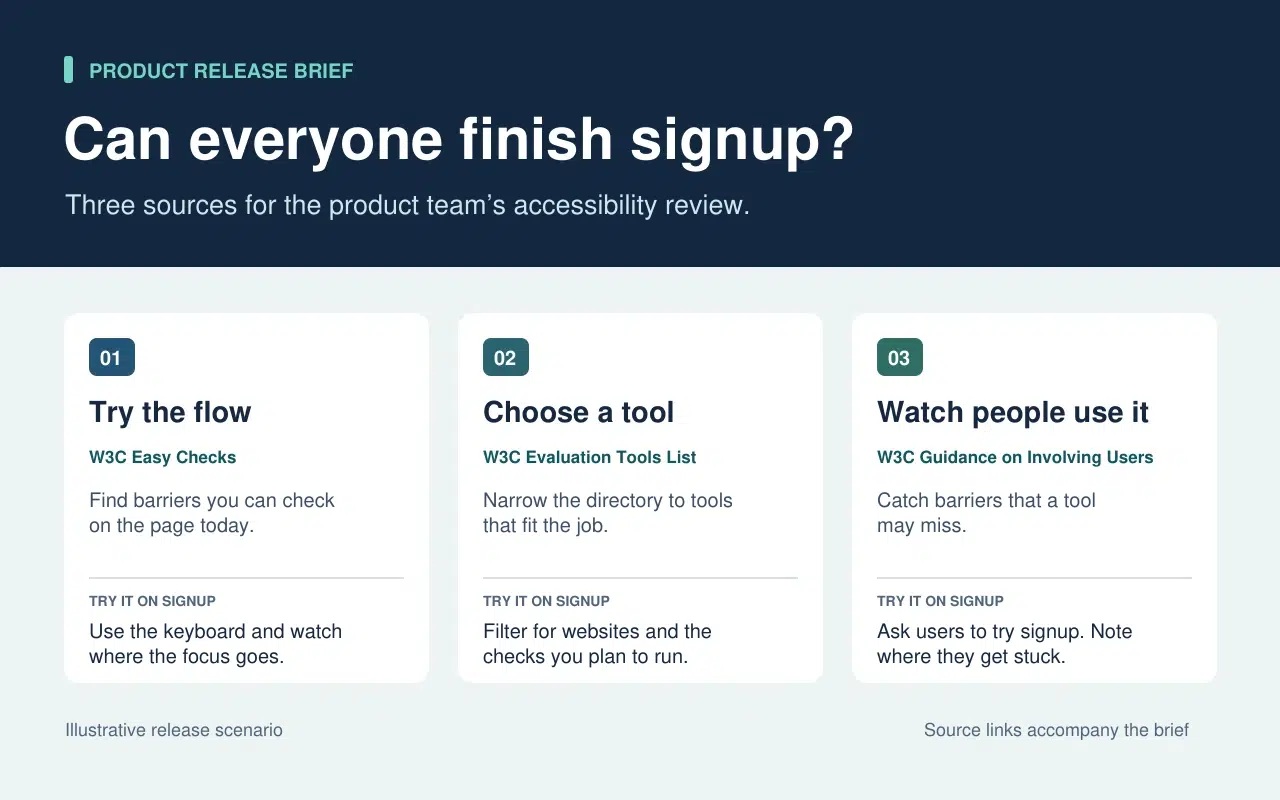
Your team is about to release a new signup form. You’ve found a guide, a directory of testing tools, and advice on involving users. Send all three links and everyone still has to figure out where to start. Send a short brief that opens with the first check, and a teammate can start right away.
Here’s how to choose the sources for that release brief and turn it into a short narrated video with Recastia. The three content curation examples later in the article show what to put on the page, what to leave behind a link, and when a little explanation helps. You can use the same content curation examples to plan a brief for your own team.
Choose What the Team Needs to See
The release lead needs to know what the team can check today and what needs more time or help. That decision sets the order of the brief. Start with a keyboard check the team can run now. Then point to tools for anything that needs a closer look. Finish with the checks that require watching people use the form.
| What Goes Into the Brief | What Stays in the Source |
| A quick keyboard check from W3C Easy Checks. Start at the email field and press Tab. Record the last control you could identify if the focus indicator disappears. | The rest of the preliminary checks. Link to them so a teammate can use the full checklist in a broader review. |
| A link to the W3C evaluation tools directory beside the task that still needs a tool. | The full list of tools, which people can filter once they know what they need to test. |
| One action from the W3C guidance on involving users. Ask participants to go through signup and note the first step where they need help. | The full guidance on planning a user evaluation. Keep it available to the person running the session. |
The written brief gives each link a reason to be there. If a source doesn’t change what someone should check or do next, leave it in the research notes. That keeps the release brief short enough to use during the review.
Turn the Brief Into a Short Video With เรคาสเทีย
สร้างวิดีโอสำหรับเพื่อนร่วมทีมที่พลาดการตรวจสอบเวอร์ชันใหม่ หรือต้องการคำอธิบายสั้นๆ ก่อนที่จะทดสอบแบบฟอร์ม คงไว้ซึ่งเนื้อหาที่เป็นลายลักษณ์อักษรพร้อมลิงก์แหล่งที่มา ในวิดีโอ ให้ใช้เสียงบรรยายเพื่อชี้ให้เห็นสิ่งที่บางคนอาจมองข้ามไปหากอ่านแบบผ่านๆ.
- กำหนดให้แต่ละงานมีหน้าเว็บเป็นของตัวเอง
ใช้ข้อมูลสามแถวในเอกสารสรุปเพื่อสร้างไฟล์ PDF สามหน้า หน้าแรกแสดงจุดเริ่มต้นของการตรวจสอบแป้นพิมพ์ หน้าที่สองขอให้ทีมระบุสิ่งที่ยังต้องทดสอบก่อนที่จะเลือกเครื่องมือ และหน้าสุดท้ายอธิบายสิ่งที่ต้องบันทึกเมื่อมีคนลองใช้แบบฟอร์มลงทะเบียน รักษาความชัดเจนของเนื้อหาในแต่ละหน้าแม้ในขนาดวิดีโอ คำแนะนำหนึ่งข้อและตัวอย่างสั้นๆ ก็เพียงพอแล้ว.
- เพิ่มคำอธิบายในรูปแบบ PDF ลงในวิดีโอ
Upload the three-page brief to แปลง PDF เป็นวิดีโอ and choose a template that keeps the instructions easy to read. In the page-by-page workflow, enter a line of narration for each page. On the keyboard page, say “Press Tab from the email field to Continue. If you lose track of the focus indicator, write down the last control you could see.” On the user session page, tell the team what to record when a participant asks for help.
- ดูตัวอย่างวิดีโอพร้อมคำอธิบายโดยย่อที่อยู่ข้างๆ
สร้างวิดีโอและหยุดไว้ที่ขั้นตอนแรก ตรวจสอบให้แน่ใจว่าการกระทำบนหน้าจอตรงกับเสียงบรรยาย และคำบรรยายใต้ภาพทำให้คำแนะนำอ่านได้ชัดเจน แชร์วิดีโอควบคู่ไปกับเอกสารสรุปที่เป็นลายลักษณ์อักษร เพื่อนร่วมทีมสามารถดูวิดีโอสาธิตก่อนทำการทดสอบ และกลับไปที่คำแนะนำต้นฉบับได้โดยตรงเมื่อต้องการรายละเอียดเพิ่มเติม.
Three Public Examples and What to Borrow From Each
Make It Easy to Narrow a List
The W3C directory puts its filters before the tool entries. Readers can choose what they need to test before they browse names. In the release brief, borrow that idea by telling the team which check to run before you send them to the directory.
Put Evidence Where Readers Need It
The UK Parliament’s Heat Networks briefing opens with the findings. It then explains how buildings share a network before discussing where one would work, who pays for the pipes, and what customers experience. Borrow the sequence. Give the team enough context to understand the first check and put deeper evidence where it affects a decision.
Give Each Link Enough Context to Earn a Click
An issue of The Browser introduces a piece about cryptic crosswords and modernist poetry, then tells you it runs to 3,630 words. The description helps you decide whether it’s interesting. The word count helps you decide whether to read it now. In a work brief, a section name or a page number can do the same job. Tell a colleague where to look before they open a long report.
คำถามที่พบบ่อย
ตรวจสอบใบอนุญาตและเงื่อนไขการนำไปใช้ซ้ำก่อน หากไม่แน่ใจเรื่องการอนุญาต ให้ใส่ลิงก์ไปยังต้นฉบับและอธิบายข้อค้นพบที่เกี่ยวข้องด้วยคำพูดของคุณเอง อย่าลืมระบุแหล่งที่มา วันที่ และข้อจำกัดใดๆ ที่ส่งผลต่อความหมายของแผนภูมิ.
ตรวจสอบว่าแต่ละเครื่องมือวัดอะไรและวัดเมื่อใด หากความแตกต่างส่งผลต่อสิ่งที่ทีมควรทำ ให้ใส่ผลการค้นพบทั้งสองลงในเอกสารสรุปและอธิบายว่าแต่ละเครื่องมือใช้กับสถานการณ์ใด ให้ผู้อ่านสามารถดูรายละเอียดเพิ่มเติมได้จากลิงก์ต้นฉบับ.
บอกสิ่งที่ผู้ชมต้องมองหาหรือทำขณะที่หน้าเว็บแสดงอยู่ หากหน้าเว็บมีขั้นตอนสามขั้นตอนอยู่แล้ว ให้พูดอธิบายขั้นตอนที่ผู้คนมักลังเล ลองพูดประโยคนั้นออกเสียงก่อนที่จะสร้างวิดีโอ.
ตรวจสอบอีกครั้งเมื่อมีการเปลี่ยนแปลงงาน ตัวอย่างเช่น สำหรับการตรวจสอบการลงทะเบียน ให้อัปเดตการตรวจสอบแป้นพิมพ์หากแบบฟอร์มย้ายปุ่ม "ดำเนินการต่อ" หรือเพิ่มช่องข้อมูลใหม่ อัปเดตไฟล์ PDF และคำบรรยายวิดีโอที่ได้รับผลกระทบพร้อมกัน เพื่อให้ทั้งสองเวอร์ชันให้คำแนะนำเดียวกัน.
บทสรุป
The content curation examples in this article show how much work one small editorial choice can save. A filter narrows a long list. A well-placed finding answers a question before readers have to dig for it.
Use these content curation examples on a brief your team already needs. Write one action beside each source, then make a short Recastia walkthrough for any check people need to hear explained. Keep the brief and its links beside the video so people can follow through.
เปลี่ยนไฟล์ PDF ของคุณให้มีชีวิตชีวาด้วย Recastia
สร้าง ปรับแต่ง และแบ่งปันเนื้อหาของคุณในรูปแบบที่น่าสนใจยิ่งขึ้น.