
Your team is about to release a new signup form. You’ve found a guide, a directory of testing tools, and advice on involving users. Send all three links and everyone still has to figure out where to start. Send a short brief that opens with the first check, and a teammate can start right away.
Here’s how to choose the sources for that release brief and turn it into a short narrated video with Recastia. The three content curation examples later in the article show what to put on the page, what to leave behind a link, and when a little explanation helps. You can use the same content curation examples to plan a brief for your own team.
Choose What the Team Needs to See
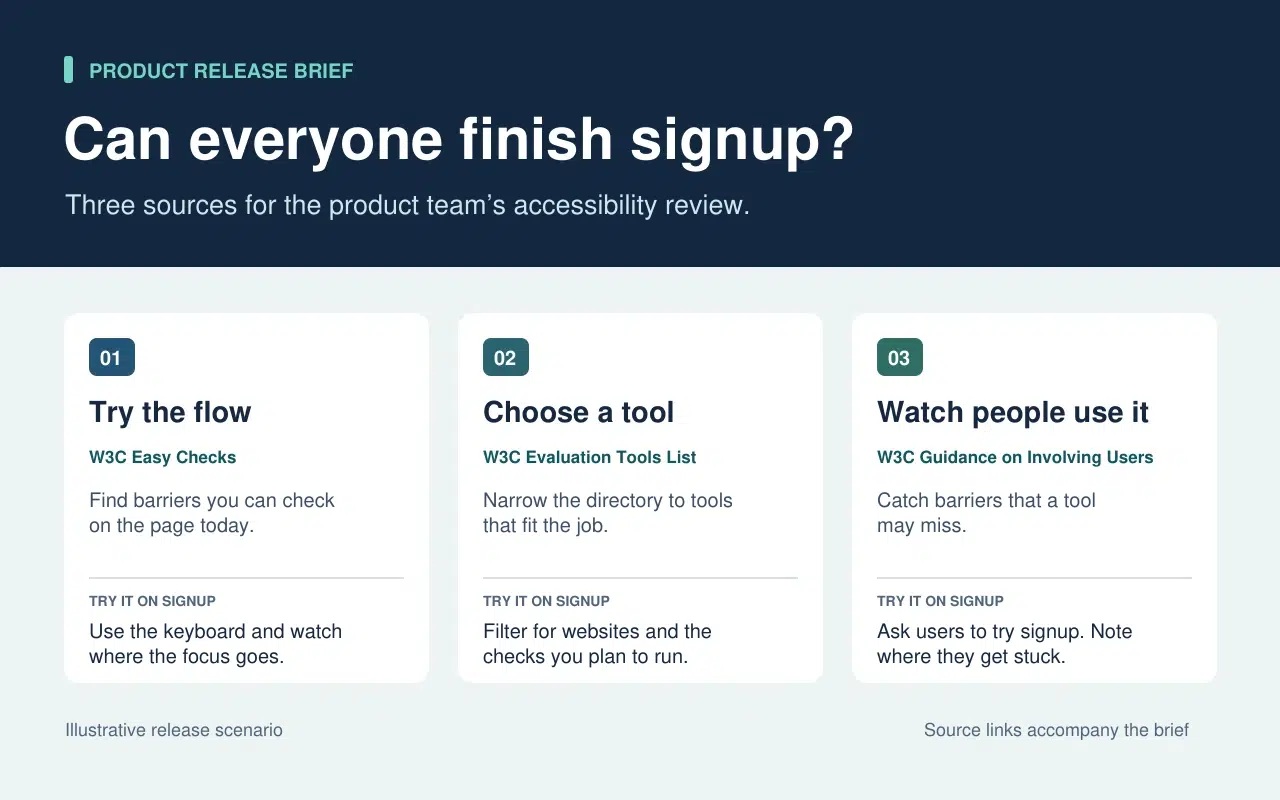
The release lead needs to know what the team can check today and what needs more time or help. That decision sets the order of the brief. Start with a keyboard check the team can run now. Then point to tools for anything that needs a closer look. Finish with the checks that require watching people use the form.
| What Goes Into the Brief | What Stays in the Source |
| A quick keyboard check from W3C Easy Checks. Start at the email field and press Tab. Record the last control you could identify if the focus indicator disappears. | The rest of the preliminary checks. Link to them so a teammate can use the full checklist in a broader review. |
| A link to the W3C evaluation tools directory beside the task that still needs a tool. | The full list of tools, which people can filter once they know what they need to test. |
| One action from the W3C guidance on involving users. Ask participants to go through signup and note the first step where they need help. | The full guidance on planning a user evaluation. Keep it available to the person running the session. |
The written brief gives each link a reason to be there. If a source doesn’t change what someone should check or do next, leave it in the research notes. That keeps the release brief short enough to use during the review.
Turn the Brief Into a Short Video With ريكاستيا
أنشئ فيديو لزملائك في الفريق الذين فاتهم الاطلاع على مراجعة الإصدار أو يحتاجون إلى شرح سريع قبل اختبار النموذج. احتفظ بالنسخة المكتوبة الموجزة مع روابط المصادر. في الفيديو، استخدم التعليق الصوتي لتوضيح ما قد يفوته المشاهد أثناء تصفحه الصفحة.
- خصص لكل مهمة صفحة خاصة بها
استخدم الأسطر الثلاثة في الموجز لإنشاء ملف PDF من ثلاث صفحات. توضح الصفحة الأولى نقطة بدء فحص لوحة المفاتيح. وتطلب الصفحة الثانية من الفريق تحديد ما يحتاج إلى اختباره قبل اختيار الأداة. أما الصفحة الأخيرة فتشرح ما يجب تسجيله عند محاولة أحدهم ملء نموذج التسجيل. احرص على أن تكون كل صفحة قابلة للقراءة بحجم الفيديو. يكفي تقديم تعليمات واحدة ومثال قصير.
- أضف الشرح بصيغة PDF إلى الفيديو
Upload the three-page brief to تحويل ملف PDF إلى فيديو and choose a template that keeps the instructions easy to read. In the page-by-page workflow, enter a line of narration for each page. On the keyboard page, say “Press Tab from the email field to Continue. If you lose track of the focus indicator, write down the last control you could see.” On the user session page, tell the team what to record when a participant asks for help.
- شاهد الفيديو مع الملخص بجانبه
أنشئ الفيديو وأوقفه مؤقتًا عند المهمة الأولى. تأكد من تطابق الحركة على الشاشة مع التعليق الصوتي، وأن الترجمة تجعل التعليمات واضحة. شارك الفيديو بجانب الموجز المكتوب. يمكن لأحد أعضاء الفريق مشاهدة الشرح قبل الاختبار، والرجوع مباشرةً إلى الإرشادات الأصلية عند الحاجة إلى مزيد من التفاصيل.
Three Public Examples and What to Borrow From Each
Make It Easy to Narrow a List
The W3C directory puts its filters before the tool entries. Readers can choose what they need to test before they browse names. In the release brief, borrow that idea by telling the team which check to run before you send them to the directory.
Put Evidence Where Readers Need It
The UK Parliament’s Heat Networks briefing opens with the findings. It then explains how buildings share a network before discussing where one would work, who pays for the pipes, and what customers experience. Borrow the sequence. Give the team enough context to understand the first check and put deeper evidence where it affects a decision.
Give Each Link Enough Context to Earn a Click
An issue of The Browser introduces a piece about cryptic crosswords and modernist poetry, then tells you it runs to 3,630 words. The description helps you decide whether it’s interesting. The word count helps you decide whether to read it now. In a work brief, a section name or a page number can do the same job. Tell a colleague where to look before they open a long report.
الأسئلة الشائعة
تحقق أولاً من شروط الترخيص وإعادة الاستخدام. إذا كان الإذن غير واضح، فأضف رابطاً إلى المصدر الأصلي واشرح النتيجة ذات الصلة بأسلوبك الخاص. احتفظ بالمصدر والتاريخ وأي ملاحظات تؤثر على معنى الرسم البياني.
تحقق من القياسات التي أجراها كل فريق وتوقيتها. إذا كان الاختلاف يؤثر على الإجراءات التي يجب على الفريق اتخاذها، فقم بتضمين النتائج في الموجز مع توضيح السياق الذي تنطبق عليه كل نتيجة. زود القراء بالروابط الأصلية ليتمكنوا من مراجعة التفاصيل.
اشرح للمشاهد ما يجب عليه البحث عنه أو فعله أثناء عرض الصفحة. إذا كانت الصفحة تتضمن بالفعل ثلاث خطوات، فاشرح الخطوة التي يتردد فيها المشاهدون عادةً. جرّب الشرح بصوت عالٍ قبل إنشاء الفيديو.
راجع التغييرات عند حدوثها. عند مراجعة عملية التسجيل، حدّث فحص لوحة المفاتيح للتأكد من نقل زر "متابعة" أو إضافة حقل جديد. حدّث ملف PDF والتعليق الصوتي للفيديو المتأثر معًا لضمان تطابق التعليمات في النسختين.
خاتمة
The content curation examples in this article show how much work one small editorial choice can save. A filter narrows a long list. A well-placed finding answers a question before readers have to dig for it.
Use these content curation examples on a brief your team already needs. Write one action beside each source, then make a short Recastia walkthrough for any check people need to hear explained. Keep the brief and its links beside the video so people can follow through.
أضف الحيوية إلى ملف PDF الخاص بك باستخدام Recastia
أنشئ محتواك وخصصه وشاركه بطريقة أكثر جاذبية.