
This article explains what to include in a digital employee handbook and how to organize each section. You’ll find examples from real company handbooks, a checklist for writing expense policies, and guidance on sharing your digital employee handbook with Recastia.
Key Takeaways
- The core sections cover pay, benefits, time off, working arrangements, conduct, and support contacts.
- Each policy should explain who it applies to, what employees need to do, and where to get help.
- Role-specific guides and local policy details can stay in separate documents linked from the handbook.
- The handbook needs an owner who keeps it updated and a version date employees can check.
What to Include in a Digital Employee Handbook
A handbook usually combines a brief company introduction with practical information about working there. For each section below, use your company’s own policies, contacts, and procedures.
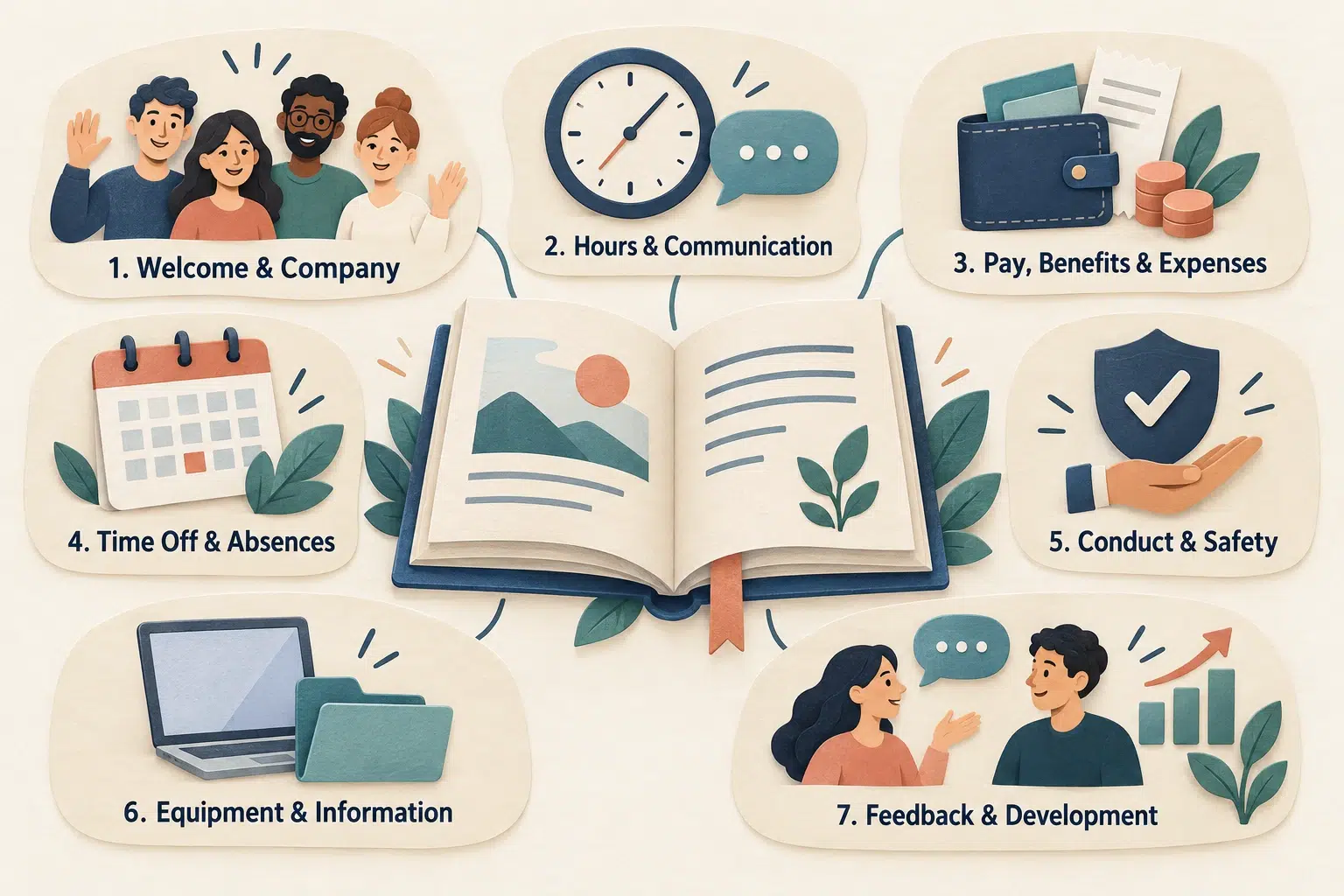
1. A Welcome and Company Introduction
Open with a short welcome from a leader and an introduction to the company: what it does, whom it serves, and how its teams work together.
A simple team overview helps new hires see who does what. Company values also need specific details. If transparency is one of them, describe how your company shares decisions or updates.
2. Working Hours and Communication
Working hours, office or remote arrangements, and attendance procedures belong together. Employees should be able to find where to check their schedule, how to record their hours, and which channel to use for routine questions or urgent requests.
New-hire tasks can have their own checklist. The 37signals Getting Started guide, for example, links to an onboarding project with tasks tailored to each person’s role. You can use the same approach to keep account setup and initial training separate from everyday working arrangements.
3. Pay, Benefits, and Expenses
Payday, payslips, and payroll contacts belong in this section. Benefits need a little more explanation: who qualifies, when enrollment opens, and where to find the plan details.
The 37signals Benefits & Perks section includes eligibility and enrollment information alongside the benefits themselves. Use your own company’s terms to answer those questions, with links to the relevant plan documents.
For expenses, explain which purchases the company reimburses and what employees need to submit. Receipts, approval requirements, and payment timing are covered in the expenses checklist below.
4. Time Off and Absences
Time-off information needs to cover two situations: booking leave in advance and reporting an unexpected absence.
- For planned leave, explain the request process, any notice required by your policy, and who approves it.
- For an unexpected absence, give the contact or reporting channel and the notification procedure.
List the available leave types and who qualifies for each. If the rules differ by location, label the local policy clearly and link to it beside the request instructions.
5. Conduct, Safety, and Reporting Concerns
Conduct policies explain the behavior the company expects and how employees can report a concern. Alongside the conduct, anti-harassment, and anti-discrimination policies, include the reporting contact and any alternative route your company provides.
Safety information needs its own clear headings. Keep emergency procedures, accident-reporting instructions, and relevant workplace contacts easy to locate within this section.
Have the responsible HR or legal reviewer approve these sections. Their wording and legal effect depend on the employer and jurisdiction. For example, UK guidance from Acas notes that staff handbooks can contain contractual terms.
6. Equipment and Information Handling
This section is the place for your IT support contact, lost-device reporting instructions, and guidance on using company accounts and equipment.
Link to detailed security procedures in the appropriate internal resource. Keep passwords, recovery codes, and personal employee records out of any handbook shared publicly.
7. Feedback and Development
Explain how feedback and review conversations work: who holds them, how employees should prepare, and where to find any forms or guidance. If your company offers training, include how to request it and whom to ask about approval.
Link to separate training guides for detailed job instructions. The handbook only needs to explain how employees can find and access them.
Make Each Section Useful: Explain the Next Step
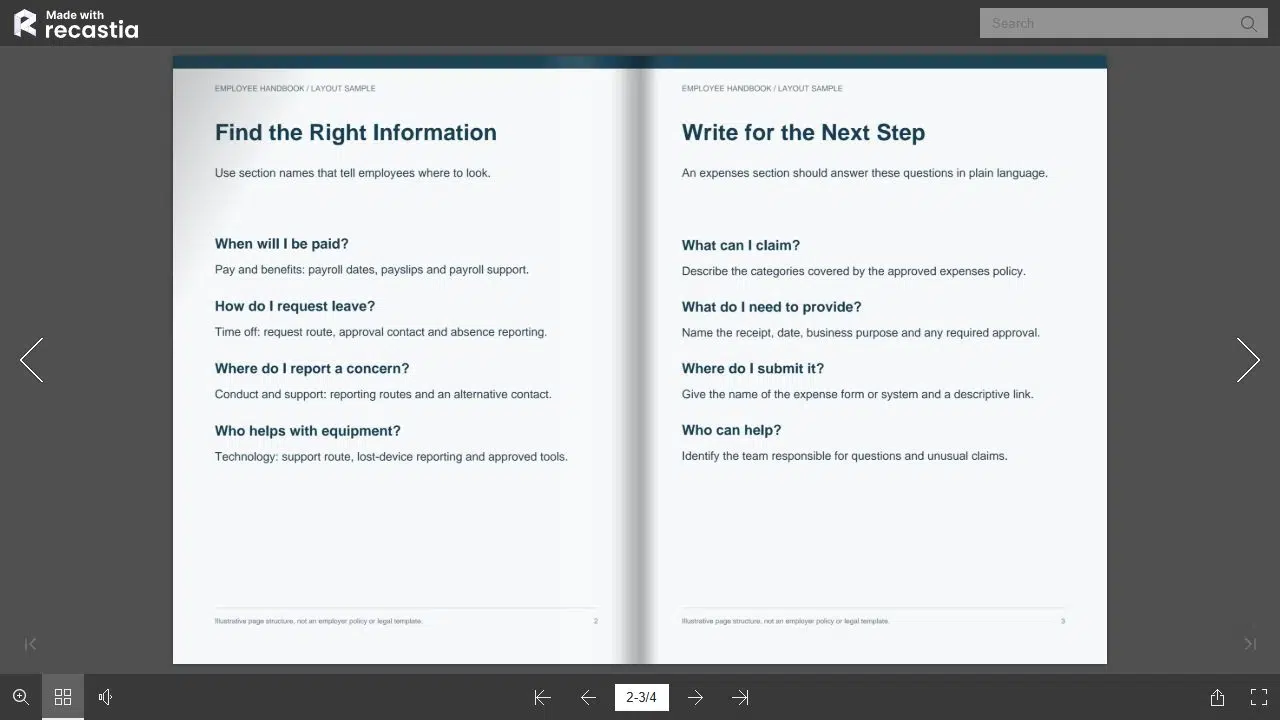
The expenses section is a good place to check whether your instructions are complete. Employees need to know whether a purchase is covered before they gather receipts and submit a claim. The checklist follows that order:
| Employee’s Question | Information to Include |
| Can I claim this expense? | Covered categories, exclusions, and any prior approval required by your policy. |
| What do I need to submit? | Required receipts, purchase date, business purpose, and other supporting records. |
| Where does the claim go? | The form or system, the submission route, and the person or team that approves it. |
| What happens next? | The payment timing stated in your policy and the contact for questions about a claim. |
Beside the submission instructions, name and link to the actual expense form or system. Include the contact for a missing receipt, a rejected claim, or a payment question, using your company’s approved process.
Arrange the Handbook for Quick Reference
Once the content is written, organize it under familiar labels such as “Pay and Benefits,” “Time Off,” and “Equipment and IT Support.” Use the same labels on the contents page and on the relevant pages.
The 37signals handbook separates Getting Started, Benefits & Perks, How We Work, and Code of Conduct. Each label tells employees what they can expect to find in that section.
Detailed documents can stay separate, with links where employees need them:
- Benefits summaries can link to the current plan documents.
- Onboarding information can link to each role’s checklist.
- Common policies can link to approved country or location-specific details.
GitLab's benefits handbook separates company-wide and entity-specific information. If your company operates in several locations, a shared overview with clearly labeled local details can keep employees from confusing one location’s benefits with another’s.
Share the PDF Handbook With Recastia
When the handbook is ready and approved for online sharing, upload the PDF to the Flipbook Maker. Recastia turns it into a flipbook that employees can open in their browser. They can turn the pages, select a page from the thumbnails, or zoom in on the text.
Give the flipbook a descriptive title and explore the template, theme, background, and page-display options available in your account. Choose settings that suit the handbook’s layout and your company’s branding.
Share the generated link through the channel your company uses to distribute staff resources. If the handbook is intended for public access, you can also embed it on a website. Confidential policies and employee information should stay within your approved internal systems.
Give the Handbook an Owner and a Version Date
Assign a team to maintain the handbook and put its contact details near the contents page. Add the version and effective date there too, so employees can identify the edition they are reading.
When a policy changes, update both the source document and the copy you distribute. Tell employees which section changed and when the change takes effect. A short update notice can point them straight to the revised policy.
Start With the Answers Employees Need
Build your digital employee handbook around the questions employees ask, with a clear action and contact wherever they need help. Once the content is approved, upload the PDF to Recastia and share your digital employee handbook as an online flipbook.
Bring Your PDF to Life With Recastia
Create, customize, and share your content in a more engaging way.
Frequently Asked Questions
There is no single page count that suits every company. Cover the policies and practical information employees need, then link to detailed plans or role-specific guides. Do not shorten essential policy wording just to hit a page target.
A shared link is not an acknowledgment record. If your company requires employees to confirm receipt, use its approved HR or signature process and identify the handbook version involved.
An employee handbook explains company policies and everyday working arrangements. An onboarding guide gives new hires a sequence of tasks to complete as they settle in. Employees may finish the onboarding checklist, but they will continue referring to the handbook.
Write and maintain the handbook in an editable document, such as Word. Once the content is approved, export a PDF for distribution or upload it to Recastia to create a flipbook.